
As a well-respected, multi-national technology company that offers cutting-edge communication solutions for a wide range of different businesses and different areas within those businesses, Avaya is a brand that very rarely disappoints its customers – but does the Avaya Vantage live up to the reputation of its predecessors?
In this article we shall give an impartial review of the pros and cons of the Avaya Vantage, informing you of what the product is capable of, what area of business it is most suited to and what makes it different from other products available on the market. However, it is important to note that we are not selling this product, nor are we directing you towards any businesses or websites that do, we are simply giving our professional opinion on how useful the product may or may not be to your business and we encourage you to do the same by contributing to our comments and review section located at the bottom of this page.
What is the Avaya Vantage?
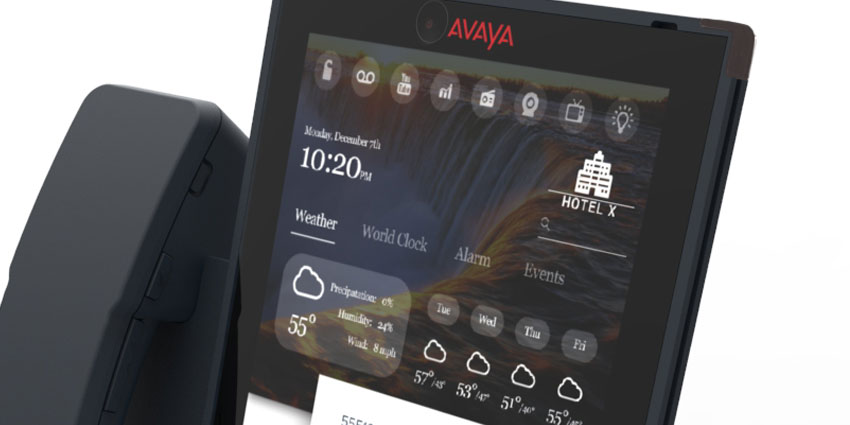
Released in the summer of 2016, the Avaya Vantage is a top of the line, high quality, multi functional communications device that offers users a multitude of innovative features that are easily accessible via an extremely stylish and eye-catching all-glass, touch screen display.
At first glance you can’t help but notice how beautiful and elegant this handset looks when placed next to a less contemporary (albeit a lot less expensive) model. In lieu of clunky plastic buttons and a low visibility display, the Avaya Vantage offers a large, sleek glass facing that looks more like an iPad than a telephone and undoubtedly gives office spaces and desktops a much more classy and professional forward-thinking business look.
What are the Standard Features?
Along with the many unique features offered by this phone system (which we shall explain later), the Avaya Vantage remains consistent with its standard features that the brand has become well known for. These include both making and receiving calls with enterprise quality audio, as well as offering users staple communication features like Call Hold, Transfer, Forward, DND, Redial and Voicemail access all at the click of a button (or in this case a tap on the screen).
What are the Advanced Features?
Alongside a beautiful 8” Capacitive Touch display with an 800x1200 resolution, this device can also come with an integrated video camera for face-to-face conferencing and/or business related calls, as well as operating on both wired or wireless network connectivity for added mobility in and around the office.
Thanks to an integrated Bluetooth system, the Avaya Vantage can also be paired with a wide variety of accessories such as headsets and wireless handsets to free users from the restrictions of the traditional desktop phone and allowing them to continue with other tasks whilst taking a call.
What are our favourite bits?
Clicking through the Touch Screen Display and quickly finding the relevant contact information or service feature is a breeze and is actually quite enjoyable. For some reason even the most menial of tasks become fun and make your regular old button-pushing phone system feel like a relic that was that was resurrected from the ancient tomb of some Egyptian Pharaoh.
We also loved the fact that there is an option for an Integrated Eye-to-Eye Camera that allows users to speak face to face with clients or colleagues and believe this factor can really help bring a business into the 21st century where video calling is fast becoming one of the most popular means of communication.
Finally we also loved the fact that use can put all of their applications on this phone and, thanks to the Avaya BreezeTM Client SDK, are able to personalise the handset to match their own particular preferences for a much faster and comfortable way of business communication.


