
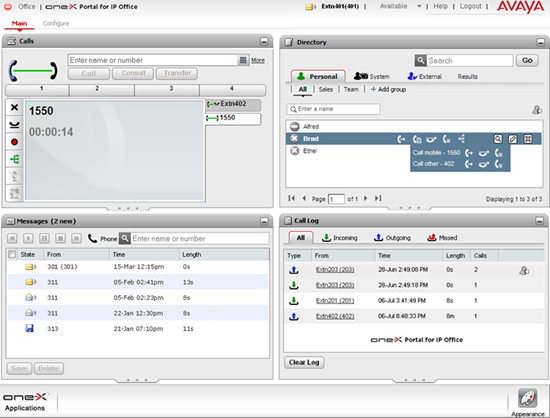
As one of the company’s flagship products, Avaya’s IP Office is the phone system of choice for many businesses and has a number of features and benefits that can help improve the quality of service delivered by employees. However, in an age where the demand for remote working solutions continues to grow, how does Avaya compare with its competitors?
With this in mind, we have completed an in depth review of the Avaya One-X Portal for IP Office whereby we indicate, examine and explain all of the features available and offer out opinion on which types of businesses and users we think would benefit most from it.
Having said that, before we continue we must stress that we are not selling this product and any information we provide is just honest advice from a group of tech-savvy professionals who can simplify the features so that you can decide if they are right for you.
Look and feel
After logging into the Avaya One-X web portal, users are greeted by a screen that is split into four separate sections that each offer a number of different features to help improve call quality and communication as a whole. Within each of these sections, the One X-Portal enables users to quickly access call control, visual voicemail, contacts directory and call logs all from a single web page that, much to the benefit of remote workers, can be accessed from any location with a working internet connection.
What can it do?
With the active call control feature, users are able to quickly make, hold, mute and transfer live calls directly via the upper left section of the portal screen. As well as giving users speedy access to a wide variety of call control features from a single page, this section also interacts with the contact directory located on the opposite side of the screen, allowing users to quickly add callers to live calls for conferences by selecting them from the contact list. We also noticed that each contact in the list has a presence status to notify other contacts of their current availability, ensuring no time is wasted trying to connect with a contact that is away from their desk or busy with a client.
Moreover, the Avaya One-X also offers a visual voicemail section that allows users to play, pause, rewind and fast forward audio recordings of messages left on their voicemail much in the same way they would with an iTunes file or an audiobook. By using this feature, users are given the freedom to skip back and forth to replay important parts whenever necessary without having to listen to the message again in its entirety.
Another interesting features we noticed was the call log feature in the lower right portion of the screen that keeps around the clock records of all calls made and received through the account. With this 24/7 coverage, the call log feature continues to work regardless of whether the user is logged into their account or not, ensuring that no missed calls ever go unnoticed and no numbers are ever lost.
What are our favourite bits?
One of the standout features that really impressed us was the teleworker configuration setting that allows homeworkers to redirect incoming and outgoing calls through a phone number of their choice. Once the number has been entered and the teleworker mode is selected, all calls made to the office number can be answered on a user’s home phone or mobile device and managed onscreen via the Internet portal window.


