At this year's Facebook Flow conference, the Workplace by Facebook team made several exciting announcements. According to the group, Workplace now has more than 3 million paid users, and it's rolling out new functionalities for front-line workers too. However, for company's interesting in creating more intelligent meeting experiences for their employees, there was one particularly exciting update: the arrival of Workplace for Portal.
Facebook will now be offering an app that allows team members to make video and voice calls through the series of Portal hardware tools available from Workplace. The smart-camera solutions from Facebook will overlay the Workplace UI on top of your display, to provide a quick and easy video conferencing image.
Up until recently, Portal has been a largely consumer-focused initiative from Facebook, although some companies and individuals have commented on its potential to be used as a business device. Now that Facebook Portal and Workplace can officially work hand-in-hand, we thought it was about time we gave the tool a proper review.
Facebook Portal Portfolio: Features
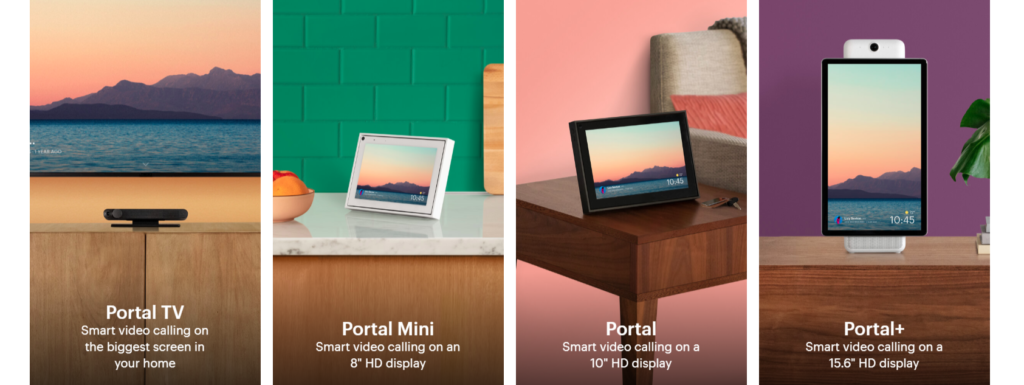
Facebook offers four different devices within the Portal lineup, including the Portal, Portal Mini, Portal Plus, and the latest Portal TV - a set-top display that allows you to use your television as a display. For the most part, all of the hardware options offer similar functions such as:
- Smart camera functionality that automatically adjusts to where the action is
- Options to make video calls via WhatsApp, Facebook, and now Workplace too.
- High-quality visual display with AR effects
- Alexa built-in for complete intelligent control over your meetings
- Privacy by design with a camera and microphone that you can easily disable
- Coverable camera for extra peace of mind
- Various applications for extensibility
- 30-day free trial
- Landscape or portrait mode available
The main difference between the various items in the Portal portfolio is the size of the smart display that you'll end up with. The Portal itself is 10 inches, while the Portal Mini is a little smaller at 8 inches, and the Portal TV allows you to choose the size of your display by using any television you have lying around. The Portal Plus comes with a larger, but still relatively portable 15.6-inch screen.
Facebook Portal: Made for Video Conferencing
Today's Facebook customers can do a lot of different things with Facebook Portal, including reading stories to their children over the web or adding fun effects to their videos, such as having a cat sitting on your head as you talk. However, for the most part, those features aren't going to make a big difference to your business.
For modern companies in search of an efficient mode of communication, Facebook Portal's leading feature is its high-quality video and audio conferencing. Most of the time, when you're video chatting through an intelligent display or smartphone, you'll have to sit right in front of a webcam to maintain a good field of view. However, in today's highly dynamic office, this kind of camera focus doesn't always work out. Facebook's Portal solution comes with an AI that digitally zooms, pans and crops recorded video to ensure that you and your team members stay in the frame - no matter where you move. This makes Portal an excellent option for companies with busy huddle spaces and presentations to think about.
The AI experience is very smooth and appealing so far, making it easy to see how Workplace and Portal could combine to create a more immersive video meeting space for today's workers. At the same time, the calls made from portal devices are remarkably clear too. You can start a call from your smartphone and transfer it to portal, without any disruptions or gaps as you move from one device to another.
Bringing Facebook Portal into the Office
Now that Workplace by Facebook has its own app for Portal, we're bound to see more companies taking advantage of the features that seem so compelling for business users. The Workplace app is already business-ready, with enterprise-level features designed to give you more control over your collaborative moments in the workplace. What's more, with Portal, you'll have access to:
- Advanced camera AI: The camera follows your presenter or the person speaking in your meeting around the room, wherever they might roam
- Flexible presentation options: Perfect for use with smart boards and whiteboards in the conference room
- Access to advanced video tools: Like the newly-announced automatic captioning available to hearing-impaired users, and peer-to-peer broadcasting that makes high-quality video streaming easier
- Top-quality audio: Portal delivers crystal clear audio so users can listen to both calls and music with ease. You can hear the other person clearly in your conversation, even if they're standing several feet from the camera.
- Easy content sharing: Facebook's Portal devices also come with the option to share photos and digital content - making it a great option for conducting collaborative conversations
Another point worth noting is that all of the devices, even the solution for the Facebook Portal TV, are fairly small in size. Either you can take a tablet-sized device with you into any meeting room to launch a video conversation, or instantly plug into a television using Portal TV. This would make Facebook Portal a fantastic tool for today's flexible conference spaces and huddle rooms.