
One of the critical challenges in selling AI-powered products to customers is making its feature set actually palatable. Terms such as Large Language Model and Machine Learning sound impressive, but for many customers, they don't illustrate how AI can practically help its organisation.
The marketing around Microsoft Copilot, the tech giant's flagship AI product, has been engaging, not least during CEO Satya Nadella's passionate keynote at the Copilot and Surface event last week.
However, Copilot has been at its most compelling when Microsoft has explored its specific use cases — especially with its enterprise-targeting 365 Copilot iteration of the service. When these features are examined in depth, the actual value of Copilot's potential can be understood, and last week's show reaffirmed that 365 Copilot could genuinely transform how a business, its leaders and its employees work.
Creating New Projects, Blogs or Presentations Through Assessing the Internet and Business Files and Interactions
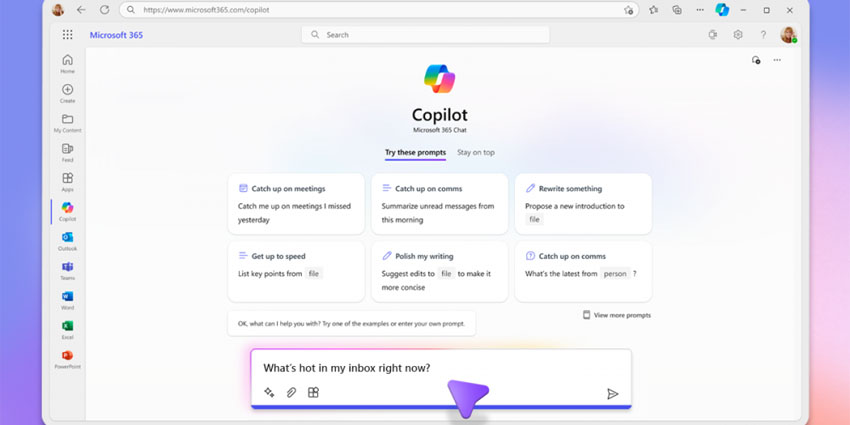
If a user prompts Copilot's M365 Chat for an informed answer to a question, Copilot scans through either (or both) of the internet or a user's recent e-mails, meetings, conversations and files to extract the critical information. The pitch is that Copilot is clever enough to discern what sources to pull from and what information is relevant and useful based on the user's prompt.
Copilot can also simplify market research by scanning the internet and producing a list of sources so the user can fact-check the credibility of the information if pulled from the web.
Colette Staullbaumer, General Manager of Microsoft 365 and Future of Work, cited an example of a marketer at a chain of home improvement stores who wants to undergo market research on square footage and proximity of competitors. This task would traditionally take several hours, but Copilot produces in seconds — and presents the data in a visually pleasing and accessible table format.
"You just saw a complex multi-step process where Copilot understood your intent, cross-referenced information from the web with your unique universe of data at work and connected the dots to give you just what you needed," Staullbaumer explained.
M365 Chat can create entirely new blog posts or project by having the relevant files inputted as part of the prompt and, for example, asking Copilot to choose the five most prominent aspects to fill into the body of the post, and Copilot will process it in seconds, including with context intros and outros.
While this style of conversational AI will be familiar to anyone who's dabbled with OpenAI's ChatGPT, M365 Chat looks a little more refined. There is the benefit of Microsoft's commitment to data privacy and security for when users input confidential or proprietary business information in their prompts — an issue which public conversational AIs have faced criticism for.
M365 Chat and its Potentially Creative External Plugins
Building on M365's potential, its capacity to connect to external plugins can expand its potential even further, as users won't need to app-switch.
One example Staullbaumer highlighted was integrating the company's travel booking system into M365 Chat as a plugin. After being sent the travel information of a coworker over email, a user can then ask Copilot to examine the email before compiling a parallel travel itinerary of flights and hotels in moments via the business's travel booking system. Users can choose to view other flights or the final details or book with just one click.
Microsoft has said that M365 Chat supports plugins from any data source, so the integration possibilities are impressive.


