

As businesses continue evolve and the demand for solutions that cater for the communicative needs of mobile workers continues to rise, the competition between rival IT & Telecoms industries grows alongside it and, as a result, the market is now flooded with countless brands claiming their product the best.
With this in mind, this article shall offer an in depth review of the Mitel Phone Manager App, offering a detailed insight into the features available and offering advice on which kinds of businesses and users would benefit most from it.
However, before we continue, we must stress that we are not trying to sell the product and any advice we give is purely written to help potential buyers determine whether or not the solution is suitable for their business.
Look and feel – how does this app look on your mobile device?
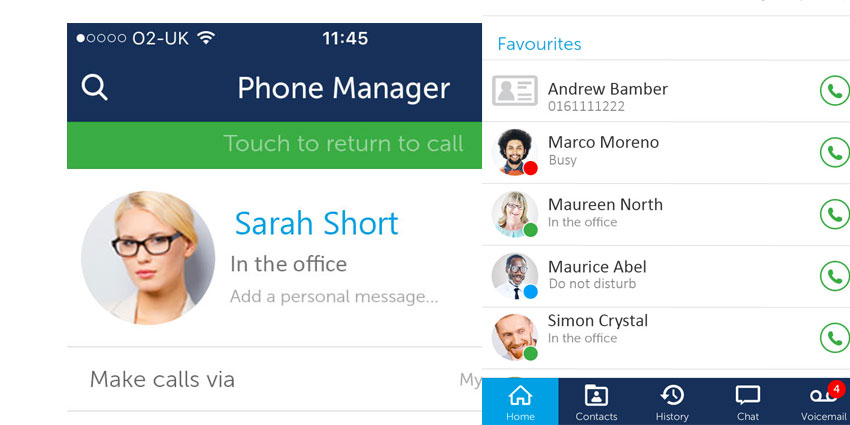
With its minimal design and white/navy interface, this application reminds us a lot of popular social media applications such as Facebook, WhatsApp and LinkedIn. Alongside the one-tap drop-down menus that grant easy access to the multitude of features, profile picture heads and presence indicators also allow users to see the faces and current status of their contacts directly from the contacts list. All in all, the app is very user friendly and it’s clear the similarities between well known social media apps were done intentionally to give the mobile phone manager a familiar, friendly feel and create an easy transition from personal to business social networking.

What can it do?
As mentioned above, the presence feature is a great addition to the app that allows users to manage their individual presence status and input personalised messages to keep all of their contacts updated on where they are at any given time. Similarly, by automatically informing users of the presence status of each of their contacts directly from the contact list, the Mitel Phone Manager Mobile App can save time a great deal of time that would otherwise be wasted trying to contact a person who is busy in a meeting or out on a lunch break etc.
Also, a built in softphone feature means users are able to transform their phone into a portable softphone that allows them to make calls from any location via WiFi and/or mobile Internet data. This way, any users who spend a great deal of time away from the office can still make/receive calls from their regular desk phone without having to be their in person.
Moreover, by granting users access to corporate directories, the Mitel Phone Manager Mobile App gives remote users and people who spend a long time out on the road the freedom to access company contact information from any location and at any time without having to report back to base.
What are our favourite bits?
We believe it’s often the smallest features that can make the biggest difference and the Mitel Phone Manager Mobile App is no exception. Thanks to its minimalist, Facebook-esque design and features such as the personalised presence message and profile picture display, existing social media mobile app users (which, as of 2017, is basically everyone) should have no problem familiarising themselves with the various tools that will rapidly increase both their productivity and efficiency in the workplace.


