
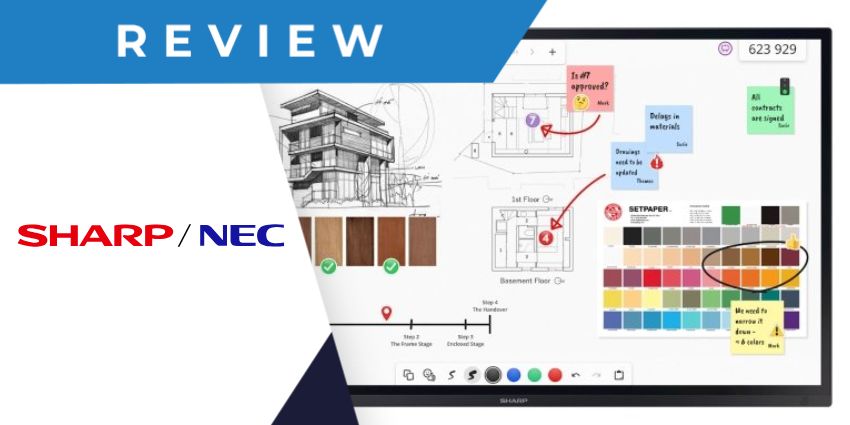
Introduced by Sharp/NEC in October 2023, the Sharp LA Series of interactive displays is designed to transform how teams collaborate in the age of hybrid work. Combining exceptional visuals with a comprehensive range of unique features, this portfolio of screens delivers what matters most to today’s teams: ease of use, security, and sustainability.
Ideal for everything from brainstorming, to meetings with remote colleagues, and even training sessions, Sharp/NEC’s collaboration displays are robust, reliable, and even customizable. So, how do they compare to the top cutting-edge screens released by AV vendors in recent years?
We took a behind-the-scenes look at the features and capabilities of Sharp/NEC’s intuitive displays for the enterprise to help you decide if they’re right for your business.
Quick Verdict: Pros and Cons
Available in three sizes, the Sharp LA Series displays are versatile screens, ideal for the enterprise environment. They’re custom-designed to ensure the highest IT security standards and come with a unique Intel SDM slot to enable comprehensive customization.
Plus, these screens come with various built-in features, like the new Sharp Meeting Launcher, as well as collaborative whiteboard software, and AirServer, for wireless screen sharing. Compared to some of the alternative products we’ve tried, like the Microsoft Surface Hub 3, however, the LA Series of screens are missing some features.
There’s no built-in camera or microphones for conferencing, and you don’t get a built-in AI assistant to help you manage the display settings hands-free. Still, these screens impress in other ways, particularly regarding sustainability and usability.
Pros:
- Incredible interactive touchscreen experience
- High-quality resolution for crisp visuals
- Modular customization options
- Integrated sensors for smarter meeting rooms
- Built-in software for collaboration
- Excellent sustainability features
- Integrated security for hybrid meetings
Cons:
- No built-in microphones or cameras
- Lacks advanced features, like an AI assistant
- Additional software costs extra
Sharp LA Series Review: Overview and Specs
The Sharp/NEC LA Series builds on the combined company’s existing portfolio of collaboration displays, such as the Sharp LB Series (for Business) and LC Series (for classrooms). More than just your standard touchscreen displays, these screens are custom-built for the needs of the enterprise.
The Intel SDM Slot, and optional SDM-L PC collaboration solution gives companies instant access to features that help them launch meetings, run brainstorming sessions and enable BYOD sharing. Plus, these displays are specially designed to reduce power consumption for eco-conscious teams.
You can use built-in sensors, like a motion sensor that automatically turns the screen on or off, depending on whether people are in a meeting room. Plus, the brightness sensor automatically controls the display's brightness based on the ambient environment.
There are three size options to choose from (65”, 75”, and 86”), all of which include similar specs, such as:
- IPS direct LED backlight panels
- 4K image resolution at 60FPS
- 20-point touchscreen technology with palm rejection
- Anti-glare, premium toughened glass
- Multiple USB, HDMI, and Display port connections
- Intel SDM for open modular intelligence
- Ambient light, temperature, and presence sensors
- Integrated software (such as FlatFrog Board for Rooms)
- Integrated audio amplifier
- Remote management via NEC NaviSet Administrator 2
- Built-in security features
Sharp LA Series: Audio and Screen Quality
Let’s start with the basics. From a visual perspective, the Sharp LA Series checks every box, offering exceptional 4K resolution at up to 60FPS. Although there are collaboration display vendors with screens that have higher resolutions, Sharp/NECs products are extremely impressive.
They deliver fantastic brightness and contrast, and they have a premium glass coating that not only boosts durability but also ensures that your content looks crisp in any environment without glare or reflections. The handy light sensor even adjusts the screen's brightness automatically for the best results.
We particularly appreciate that the screens are designed to minimize fingerprints and smudges, so you don’t have to worry as much about cleaning away smears between meetings.
When it comes to audio, Sharp/NEC have really only covered the basics. You do get a set of two 10-watt speakers built-in, which offer decent clarity and volume. However, you’ll really need to consider adding your own speakers, too, if you’re designing a larger meeting room. The integrated speakers lack a little power compared to some alternatives.
Additionally, as mentioned above, these displays don’t come with built-in microphones. You’ll need to connect external speaker phones and mics if you’re going to be using them for collaboration, which means more wires and devices scattered around your space.
Touchscreen Functionality and Collaboration
If you’re looking for exceptional interactivity, the Sharp LA Series competes well with many of the top touchscreen options on the market, with support for 20 points of contact. Notably, again, some vendors offer more advanced options, such as ViewSonic, with the Viewboard collection that can support anywhere up to 50 touchpoints (depending on your operating system)
Still, Sharp/NEC’s screens do deliver some unique benefits from a touchscreen perspective. They leverage a unique InGlass M5 premium touch system, with patented pressure sensitivity and support for passive pens and Windows Ink. They even feature “palm rejection” technology, which a few other collaboration display vendors miss.


