
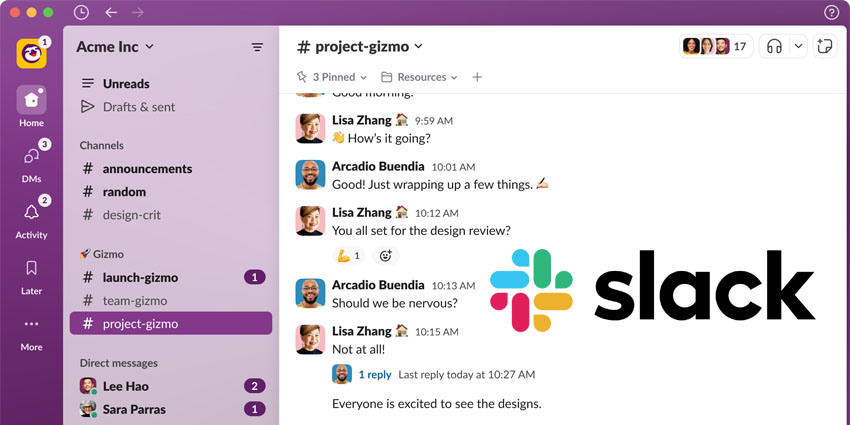
Slack has launched its new redesign, with a refined UI and enhanced user experience to improve productivity.
Slack highlights that the new design will allow users to navigate channels and conversations to work faster and efficiently, focus on tasks better without distractions, and utilise new tools to simplify the workday.
Noah Weiss, Chief Product Officer at Slack, said:
We know millions of people start and end their workday in Slack, so we took great care to ensure these improvements make it a more productive and pleasant home. The new experience helps teams stay better organised, focus on what’s important and quickly access a growing set of tools in Slack."
What Will the New Design Look Like Specifically?
Channels, direct messages and apps will still be viewable from a single page, now renamed "Home", which has had colourful tweaking to make moving between channels and apps more accessible.
Slack is also introducing a valuable functionality for Slack Enterprise Grid users — the capability to view channels from every workspace, all in Home, removing the need to toggle between workspaces.
Slack is also introducing "dedicated views" to help users focus on distraction-free work, with a section called Activity that users can enter to get up to speed with workflows quickly. Users can set aside time to respond to their unread DMs in "Direct Messages" when they’re between meetings and can save messages or action items via the "Later" option, with the ability to set a reminder to ensure it’s completed on time.
Users can also click "More" to find productivity tools, from canvas to workflows to apps. The More functionality will differ depending on paid and free Slack subscriptions.
"Designed to give you more control over where you’re spending your time, these views support the different ways that you work in Slack," Slack wrote in a blog post accompanying the announcement. "And with notifications housed deeper within these views, you can decide when you want to put your head down and work and when you’re ready to collaborate."
The new "Create" button allows users to generate new messages, channels, huddles and canvases. Slack has also updated the search experience so users can click each result to understand the full context without jumping back and forth to find what they need.
Slack's new user experience began rolling out to teams this week and will become available to all existing users over the coming months.


