For a workplace technology manager, few things are worse than loading up Microsoft Teams first thing in the morning, to find out that even though the rooms are booked, meetings aren’t starting. The executive team’s already in their seats, two directors are joining remotely, and the nearest AV engineer is in another building. So, everything grinds to a halt.
This is the problem Logitech wants to solve with its Rally room systems, and it’s more common than you might think. Jabra’s June 2026 study of more than 2,300 knowledge workers found a technology failure in 75% of hybrid meetings, with 11 minutes lost when something went wrong. Half of remote attendees said they were forgotten, talked over, or excluded.
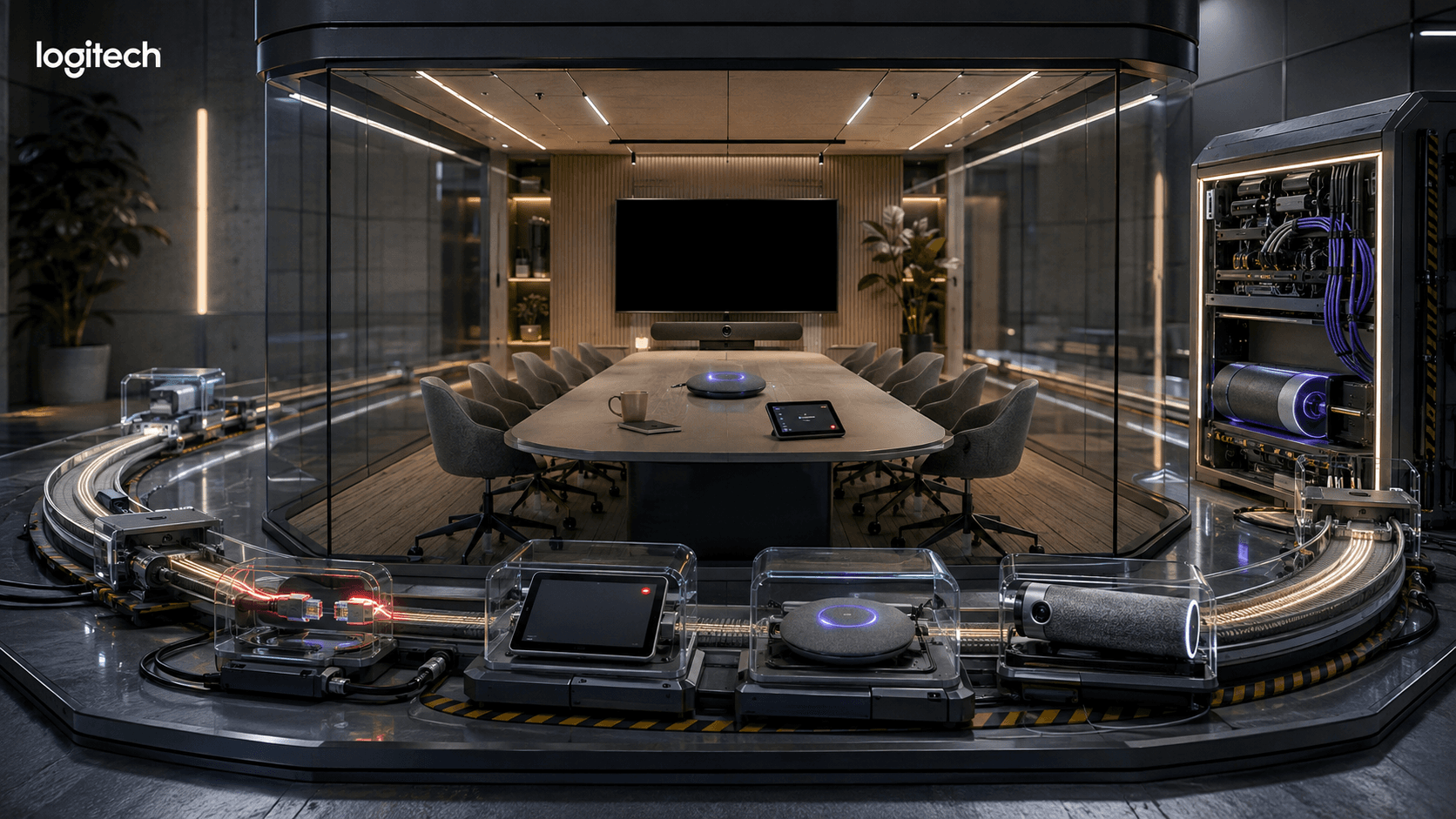
Logitech’s answer to that issue is spread across a stack rather than one hero device. Rally Bar supplies the camera, microphones, speakers, and room compute. Tap IP gives the host one place to join and share. Sight adds a center-table view. Sync watches the devices after the meeting ends. The parts are familiar. The useful question is whether they behave like one room.
TL;DR: Does the Logitech Rally Room Stack Reduce Meeting-Room Work?
- Avientek reports that PayPal India cut meeting join times by 50% once Tap’s one-touch join replaced manual setup, and cut IT support tickets by 90% once Sync gave IT remote visibility across the same 50 Microsoft Teams rooms. The figures are partner-reported, so buyers should treat them as directional evidence rather than a guaranteed result.
- The role fit is specific: Rally Bar and Tap suit a workplace team that wants consistent rooms for up to 20 people, while Sight helps where a long table leaves faces hidden from the front camera.
- Logitech shipped material room-management updates in 2026. CollabOS 2.0. A fixed a Sight failure in February, and CollabOS 2.1 added Zoom Rooms occupancy check-in, room release, environmental data, remote UI access, and Tap Cat5e firmware updates in July.
- The weak point is compatibility. Sight features differ by meeting platform and deployment mode, and Logitech’s current guide supports it with Rally Bar or Rally Bar Mini rather than every Rally product.
What Job Does Logitech Rally Need to Do?
A workplace technology manager needs Rally to keep a varied room estate predictable. Employees should enter, start the scheduled meeting, share content, and speak without learning the equipment. IT should see failures early, push updates remotely, and know whether a problem belongs to the room hardware, the platform, or the network.
Device standardization can be tricky, but for some companies, it’s essential, especially as offices fill up again. CBRE’s 2026 Workplace & Occupancy Insights covers client portfolios totaling 303 million square feet. Average utilization reached 53%, peak utilization hit 80%, and global occupancy reached 111%.
Still, Tuesday morning may put several teams in at once, while Friday leaves the same rooms empty. The workplace team has to make the available rooms dependable and stop calendar bookings from disappearing. Logitech wants to help with that.
Henkel is one company already taking advantage. The Logitech customer case study published in July 2026 covers more than 700 meeting rooms and says video calls rose by 1,100% per month. The same case study credits Sync’s centralized monitoring and remote firmware updates for cutting the need for IT support and hotline assistance across that estate. Dirk Lehmann, Head of Audio/Video Services at Henkel, said the goal was to let people stay focused on their projects rather than worry about the technology.
That’s actually a better brief than “install smarter cameras,” though Logitech is certainly tackling things from that front too, with new AI innovations across the Rally line.
For this role, the room has four moments that matter. Sync checks health before anyone arrives. Tap controls the start. Rally Bar and Sight carry the conversation. Sync then handles updates, alerts, and the first attempt at repair. A break in any one of those moments lands back on the same team.
Key Takeaways
- According to CBRE’s 2026 data, offices average 53% utilization, reach 80% at peak times, and record 111% global occupancy.
- Judge the stack as one operating workflow. An excellent camera demo says little about join time, remote visibility, or how many faults IT can fix from another site.
How Do Rally Bar and Tap Reduce Meeting-Start Friction?
Rally Bar and Tap reduce meeting-start friction by giving medium and large rooms a fixed appliance and one-touch controller. Logitech’s product page lists certifications for Microsoft Teams Rooms on Android, Zoom Rooms, and Google Meet on Android. The buyer’s real test is whether an untrained host can start without calling IT.
Logitech’s Rally Bar and Tap IP specifications position the bundle for rooms of up to 20 people. Rally Bar combines appliance compute, dual cameras, six beamforming microphones, and speakers. Tap IP runs over Power over Ethernet and handles one-touch join and wired content sharing.
CollabOS 2.1 added two practical Tap changes on July 7, 2026. Tap IP and Tap Scheduler can connect over Wi-Fi while still receiving power from a PoE switch, and Tap HDMI ingest became generally available for Microsoft Teams Rooms and Zoom Rooms, supporting companies in search of interoperability. For the workplace manager, both changes remove a common reason a room installation stalls: a switch that can’t reach a data port, and a laptop that can’t share without the right cable.
One of the most specific published outcomes comes from PayPal India. Logitech’s partner Avientek shared that the company standardized 50 Microsoft Teams rooms using Rally Bar or Rally Bar Mini, Tap controllers, and Sync. The distributor ties the 50% faster meeting joins to Tap’s one-touch start, and the 90% reduction in IT support tickets to Sync’s remote monitoring, rather than crediting the hardware alone.
A Logitech CLO Virtual Fashion case study also gives a second, vendor-reported data point. Across 13 rooms using Rally Plus, Rally Bar, Sight, and Tap with Google Meet, CLO credited Rally Bar and Sight’s automatic framing and voice optimization for a 30% increase in meeting efficiency, and Tap’s interface plus Sync’s centralized device management for nearly 40% less IT troubleshooting time.
Neither source publishes the underlying baseline or measurement method, so both belong in the “promising, test locally” column.
Key Takeaways
- PayPal India’s 50% faster joins and 90% ticket reduction are the right kind of outcomes, but the evidence comes from a deployment partner and does not disclose the measurement method.
- Run the join test with an untrained employee. Consistency across rooms matters more than whether an AV specialist can complete the workflow quickly.
Where Does Logitech Sight Improve the Remote Meeting?
Logitech Sight helps in long-table rooms where a front camera sees the backs or profiles of people speaking to each other. Logitech says Sight works with Rally Bar or Rally Bar Mini to add close views of active speakers while the front camera preserves room context.
Sight isn’t entirely new, but it’s a good insight into how Logitech has been enhancing the AI meeting room over the last few years, with a focus on reducing meeting friction.
It fixes a visibility problem rather than a resolution problem. A sharper front camera still struggles when six people turn inward for a discussion. Jabra’s June 2026 research found that half of remote attendees felt forgotten, talked over, or excluded. Workers in laptop-only rooms were 40% more likely to feel excluded.
Logitech’s Sight guide says the camera can show up to four recent speakers with a picture-in-picture group view. Smart Switching moves between Sight and Rally Bar according to the direction a speaker is facing, with a delay intended to stop the feed cutting at every interruption.
That can make a long boardroom easier to follow. It can also look inconsistent when the lighting, camera distance, or color balance differs between the table and front-of-room feeds. Logitech’s own admin guide acknowledges that image quality can vary between the cameras and says later CollabOS updates will work on the difference.
The update history deserves attention. CollabOS 2.0, released in December 2025, introduced a known issue that could take Sight offline and turn its LED red or orange. CollabOS 2.0.A fixed it on February 13, 2026. The July 2026 Sight release then corrected problems with wired-peripheral listings and dual-Sight updating and recovery.
Key Takeaways
- Sight solves a specific room geometry problem: people turning toward each other around a long table. It is unnecessary in many conventional rooms.
- Inspect the release history and test recovery. Logitech fixed a Sight outage issue in February 2026 and more dual-Sight problems in July.
Can Logitech Sync Cut the Support Load Across Multiple Offices?
Logitech Sync can cut support work when the workplace team uses it for live device health, configuration, updates, alerts, and remote access across many rooms. Basic management is included with supported products, while room insights, booking automation, Remote UI Access, and service integrations sit in paid Essential or Select plans.
Sync is valuable because the executive opening the door shouldn’t be the first person to discover a meeting room’s broken. The portal can show device status, push CollabOS updates, and group rooms by site or policy. It can also manage Sight through the Rally Bar or Rally Bar Mini it is attached to.
The licensing line needs to be in the buying model. Logitech’s US Sync page, checked July 28, 2026, lists Basic for Rooms at $0, Essential at $199 per room each year, and Select at $399 per room each year for medium and large systems.
Essential adds email alerts, ServiceNow integration, Remote UI Access, room booking, and occupancy or room-health insights. Select adds higher support and replacement coverage. The decision for the workplace manager is: pay for Essential or Select only where alerting, booking, or premium support are part of the business case, and stay on Basic everywhere else.
Logitech’s July 7, 2026, CollabOS 2.1 release notes tightened the operating story. Rally Bar and Rally Bar Mini can update a connected Tap Cat5e Kit. GoTo Resolve returned as a Remote UI option. Zoom Rooms gained Spot-based occupancy detection, automatic check-in, release of unused rooms, and environmental data.
Henry Levak, Vice President of Product at Logitech for Business, said on January 22, 2026, that Rally AI Cameras were built to solve problems “IT managers, Facilities teams, and Workplace Experience professionals face every day.” Of course, Sync still has to prove that a remote action fixed the room, not merely record that something went wrong.
Key Takeaways
- Sync Basic covers core monitoring and updates. Budget for Essential or Select when the business case depends on alerts, Remote UI Access, booking automation, insights, or premium support.
- Test the alert and repair loop, not the dashboard screenshot. Pull a network cable, trigger a firmware update, and record how quickly IT sees the fault and restores the room.
Learn more about devices, workspace tech, and endpoint management here.
What Changed in the Logitech Rally Room Systems Stack During 2026?
For the workplace technology manager tracking the roadmap rather than the spec sheet, Logitech’s 2026 room story covered everything from AI hardware updates to stronger software solutions. The company launched Rally AI Cameras for unusually large spaces, fixed a Sight outage in February, and used July’s CollabOS 2.1 release to improve Tap networking and content ingest, room occupancy, remote access, external audio, firmware management, and dual-Sight recovery.
Read together, the year’s releases point in the same direction: fewer manual site visits and fewer surprises for the workplace team, not new specs for their own sake.
Logitech’s January 22, 2026, launch separates the new Rally AI Cameras from Rally Bar. Rally Bar is an all-in-one room appliance with audio and compute. Rally AI Camera and Camera Pro are camera components for Rally audio or professional AV systems. The Pro’s stated 15x hybrid zoom earns its place only when the back row is genuinely far away.
Logitech is building these cameras into a broader room-management system. They can connect to Sync through Wi-Fi or Ethernet, supply occupancy data for planning, and work in multi-camera Teams or Zoom environments where supported. The room setup will decide how useful those features are.
Key Takeaways
- The most useful 2026 changes concern support and room readiness, not another sensor specification.
- Treat Rally AI Camera as a specialist extension for deep or professional AV rooms. It does not replace the Rally Bar, Tap, Sight, and Sync workflow in a standard meeting room.
Where Can a Logitech Rally Room Fail, and What Should Teams Test?
A Logitech Rally Room can fail when buyers assume every device, platform, and room mode works together. Sight compatibility is limited, advanced Sync functions cost extra, and strong camera framing won’t repair weak audio or networking. Test the finished room with real users, the production platform, and the support process before approving a wider rollout.
Sight needs Rally Bar or Rally Bar Mini for speaker-reference audio. Logitech lists Rally Bar Huddle, MeetUp, MeetUp 2, Rally System, and third-party audio as unsupported. Smart Switching and composite views also behave differently across appliance, Windows, and BYOD deployments.
Microsoft Teams Rooms on Windows purchasing changed on March 31, 2026, too. Logitech stopped selling its preconfigured Windows room bundles, so buyers now need to validate the Logitech devices and selected PC as one supported design.
| Risk to test |
Pilot method |
Measure |
| Meeting start |
Give the room to a first-time user. Ask them to join and share content. |
Join time; meetings started without help |
| Remote visibility |
Run a fast discussion with interruptions and distant speakers. |
Wrong-person frames; unnecessary camera changes |
| Sight recovery |
Restart Rally Bar, reconnect Sight, and run an update. |
Recovery time; settings retained |
| Audio and network |
Test the final microphones, DSP, and production network. |
Intelligibility; connection faults |
| Sync support |
Trigger a device fault and attempt a remote repair. |
Alert delay; remote-resolution rate |
| Occupancy |
Compare Spot data with manual counts and bookings. |
False readings; abandoned rooms released |
Key Takeaways
- Put the exact OS, platform, camera count, audio design, software version, PC, and Sync plan in the procurement document.
- Pull three months of room tickets and join-time data before the pilot. A showroom demo won’t prove the room works when the user is late and IT is elsewhere.
Has Logitech Built a Strong Meeting-Room Operations System?
Logitech has built a reliable room-operations system for organizations that want one repeatable pattern across Microsoft Teams, Zoom, or Google Meet spaces. Rally Bar, Tap, Sight, and Sync cover the employee and IT workflow well. The case weakens in unusual AV rooms or deployments that assume every feature works identically everywhere.
The best part of the proposition is how straightforward it all is. Tap gives people a familiar starting point. Rally Bar handles the conventional room. Sight can be added when the table geometry creates a real blind spot. Sync gives the workplace team a common view of health and updates.
That stack will be ideal for companies with dozens or hundreds of medium and large rooms that value consistency more than a bespoke design in every location. It also gives buyers a credible upgrade path: keep a simple Rally Bar room where it works, add Sight only where needed, and reserve Rally AI Camera Pro for spaces with genuine depth.
Still, Logitech’s best published results are vendor- or partner-reported. Sight has had meaningful 2026 fixes. Platform-specific behavior still needs a room-by-room compatibility sheet. Paid Sync plans also change the cost when alerts, booking automation, occupancy insights, or premium support are central to the business case.
Most companies will start with a Rally Bar and Tap pilot in one or two rooms, add Sight only where the table geometry demands it, and price Sync’s paid tiers against the specific alerts or automation the pilot proves are needed before signing off on a wider rollout.
FAQs
What is a Logitech Rally room system?
A Logitech Rally room system combines front-of-room video and audio with a meeting controller and remote management. In a common medium or large-room setup, Rally Bar supplies the camera, microphones, speakers, and appliance compute; Tap IP controls the meeting; Sight adds a table view; and Sync manages device health and updates.
What is the difference between Rally Bar and Rally AI Camera?
Rally Bar is an all-in-one room appliance with camera, microphones, speakers, and built-in compute. Rally AI Camera and Rally AI Camera Pro are camera components for large or professional AV rooms. Logitech’s January 22, 2026 launch says the Pro adds an optical camera with 15x hybrid zoom for greater room depth.
Does Logitech Sight work with every Rally product?
No. Logitech’s compatibility guide, checked July 28, 2026, supports Sight with Rally Bar and Rally Bar Mini because it needs speaker-reference audio from the front-of-room system. It lists Rally Bar Huddle, MeetUp, MeetUp 2, Rally System, and third-party audio as unsupported. Buyers should confirm the exact room mode and conferencing platform too.
What does Logitech Sync manage?
Sync can provision, monitor, configure, and update supported Logitech room devices. Logitech’s plan comparison, checked July 28, 2026, puts email alerts, ServiceNow integration, Remote UI Access, room booking, and occupancy or room-health insights in paid tiers. Buyers need to price the plan that contains the functions used in their rollout.
Can Logitech Rally rooms run Microsoft Teams, Zoom, and Google Meet?
Rally Bar and Tap IP carry certifications for Microsoft Teams Rooms on Android, Zoom Rooms, and Google Meet on Android, according to Logitech’s page reviewed July 28, 2026. The catch is feature parity. Sight and multi-camera support can change with the platform, room OS, and deployment mode, so procurement should ask for specifics, not a blanket compatibility claim.