
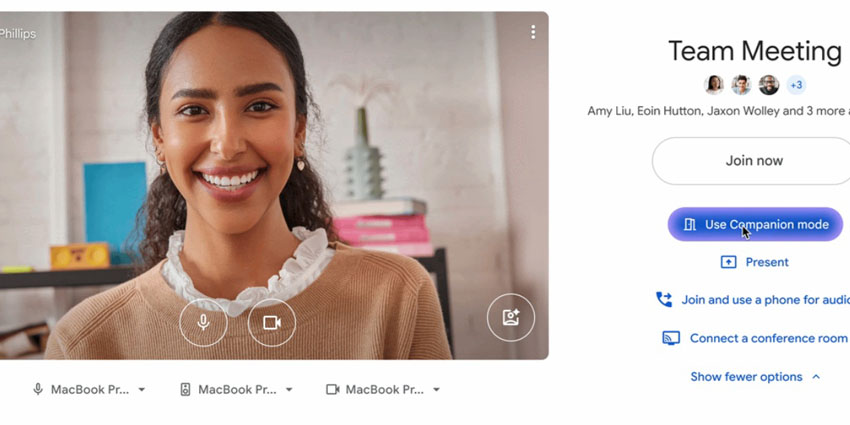
Google Meet has potentially made hybrid meetings a little smarter and a lot smoother.
Its latest update introduces automatic room check-in via proximity detection. It uses ultrasonic signals to quietly sort out one of the most irritating aspects of modern collaboration: joining a meeting the right way, in the right room, without creating an echo chamber.
But beyond the tech's slickness, there’s a deeper signal for enterprise IT, UC, and workplace leaders in that the age of context-aware collaboration is picking up speed.
A Smarter, Smoother Way to Join Meetings
Available now, Google Meet’s new automatic check-in feature uses proximity detection to do something deceptively clever. If you’re using Companion mode on your laptop within a meeting room equipped with certified Google Meet hardware, your device will now detect an ultrasonic signal from the room system and take the hint.
Before you even click "Join", Google Meet highlights the Companion mode option, steering you away from audio feedback disasters and toward a cleaner, echo-free experience. Once you join, it automatically checks you into the correct room. If Dynamic Tiles are enabled, it may also prompt you to confirm your face via Face Match, so your name appears instead of the room’s.
This is a small but subtly significant improvement to the meeting join experience, one of those high-impact UX details that reduces friction at scale. The functionality is available only on Chrome via the Meet web app, and is currently limited to the green room (the interface before joining a call) and a brief period after Companion mode begins. Google recommends sticking with certified Meet hardware, as third-party devices may not deliver consistent results.
Admins get full control, of course. Proximity detection is enabled by default, but can be fine-tuned or switched off entirely on a per-device basis from the Admin console. That means organisations with stricter security, privacy, or device management policies can adapt the feature to their own needs.
Why the C-Suite and IT Leaders Should Take Note
On one level, this is a neat trick that reduces collaboration friction. But, viewed through a more ambitious lens, it also teases the future as a window into the next evolution of unified communications, one where platforms anticipate context, simplify choices, and actively prevent the kinds of mistakes that waste time and erode productivity.
This is good news for IT and UC teams. There will be fewer “how do I join this call?” helpdesk tickets and fewer moments of embarrassment as someone accidentally joins a meeting from their laptop and the room system simultaneously. This will likely result in fewer delays while someone figures out which button to press. It’s small stuff until you multiply it across hundreds of rooms and thousands of users every single day.


