
Microsoft has announced that its Planner in Teams project management solution is now available in Public Preview.
Previously announced at Microsoft Ignite in November, the new Planner product is a result of Microsoft combining the simplicity of its To Do product, the collaborative capabilities of the previous Planner iteration, the holistic features of Project for the web, and the AI-powered turbocharger that is Microsoft Copilot into one unified service available in Microsoft Teams.
Roberto Bojorquez Alfaro, Principal Group Program Manager at Microsoft, wrote in an accompanying blog post:
The new Planner is a simple, collaborative, and flexible work management solution that’s assisted by AI and integrated into the Microsoft 365 products you know and love. From individual projects to team initiatives, the new Planner app in Teams grows with your needs and can help you and your team zoom through your tasks and plans and accelerate outcomes."
The New Planner's Feature Set in Detail
The "Tasks by Planner and To Do" app in Microsoft Teams is now the new Microsoft Planner in Microsoft Teams Public Preview.
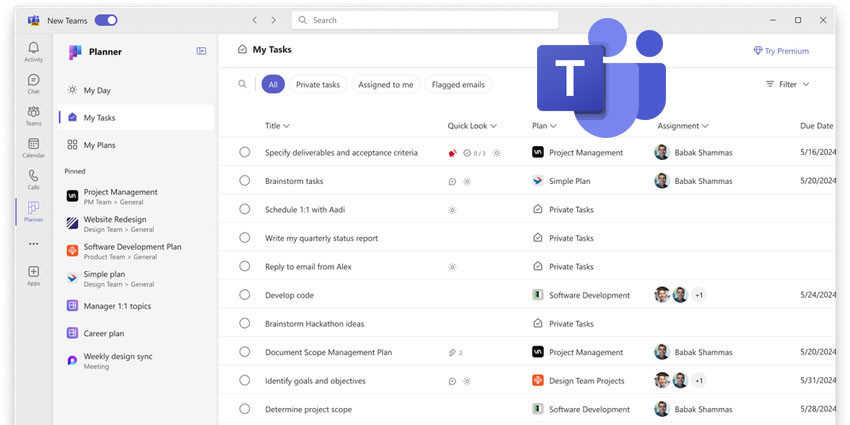
Among the new updates is a faster and more streamlined performance and user experience, with simplified navigation made up ofof three main sections: My Day, My Tasks and My Plans.
Bojorquez Alfaro outlines that the new app will include all of a user's tasks in one place. "The My Tasks view offers you a single place to see and manage your tasks with intuitive filters and search capabilities, including the source of the task, so you can get to what matters most to you fast," he wrote." This includes tasks from basic plans, premium plans, tasks from Loop, tasks from Teams meeting notes and flagged emails."
Moreover, the new My Plans view consolidates previous To Do lists, Planner plans, and Project projects into a simplified collection of plans, streamlining the process of locating the most pertinent and recent plans. In the new Planner, users can easily pin their favourite plans to the left navigation pane by selecting the plan and clicking on the pin icon.
Premium plans also offer a wealth of flexibility and advanced features. Users can create new plans from multiple templates, ranging from basic personal plans to premium plans with advanced features like Sprint planning, Goals view, People view, Timeline view with dependencies, and Custom fields. Premium plans also offer access to Copilot in Planner preview, which helps break down tasks, identify work needed for project goals, and provide project status insights.
Bojorquez Alfaro namechecks several compelling use cases for the new app, including being able to create an inspiration board to track the team ideas or a user creating a plan to track their career goals, core priorities and specific learning and training tasks they want to make progress on. Users can also track progress in their daily scrum with a sprint planning board using the built-in agile tools and load balance the work as a team using the People view.


