

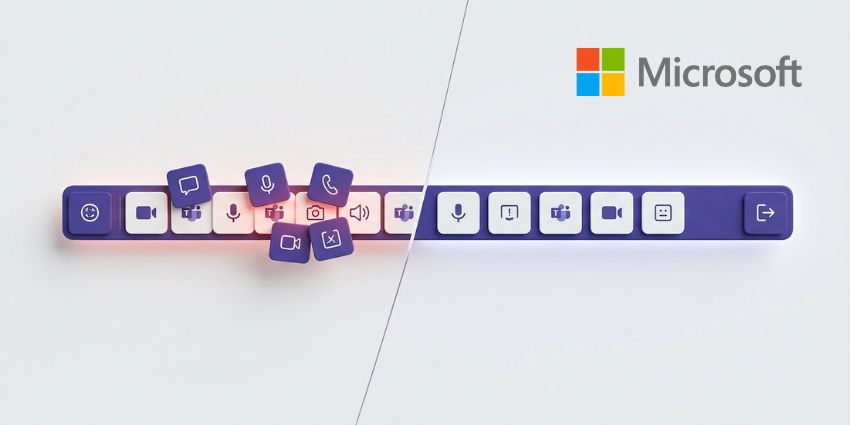
Few companies admit their products are broken. But in a Message Center notice to IT admins this month, Microsoft acknowledged that its Teams meeting controls have "grown crowded, contributing to mis-clicks between high-impact actions like Share, Leave, and Raise hand, and to accidental shares of unintended content."
It's a problem of Microsoft's own making. Every capability added over the years, from reactions and raised hands to Copilot, Whiteboard, and breakout rooms, landed in the same toolbar with no corresponding cleanup. The Leave button ended up next to Share, which ended up next to Raise Hand, and the more features Microsoft shipped, the worse the crowding got. Accidental exits and unintended screen shares became routine enough that Microsoft's own telemetry flagged them as a systemic issue, not just user error.
The response is a full redesign of both the meeting toolbar and the share panel, drawing on customer feedback and usage data, tracked on the Microsoft 365 Roadmap under IDs 502520 and 560321. Rollout starts in July 2026.
Teams Meeting Toolbar: Centred Controls and Customisable Layouts
The most visible change hits the toolbar itself. Microsoft had already taken a smaller step by regrouping the Raise Hand button under Reactions to prevent misclicks, but July's update goes considerably further. Controls move to a centre-aligned layout, with microphone, camera, and share grouped together. The Leave button shifts to the far right, and less-used actions consolidate into a reorganised More menu. Put the buttons people reach for most in the middle, and move the one that ends a meeting somewhere it can only be clicked on purpose.
Users will also be able to personalise the toolbar by pinning, unpinning, and rearranging controls via drag and drop. New meeting app pinning policies will support a maximum of two pinned apps in the main toolbar, with anything beyond that pushed to the overflow menu. Existing pinning policies continue to apply, but IT teams managing heavily customised toolbar configurations should review them ahead of July.
Redesigned Share Panel: Live Previews and Two-Step Confirmation
Accidental screen sharing is one of the more reliably embarrassing things that can happen in a meeting, and it happens often enough that Microsoft built an explicit fix into the new share panel. The redesigned panel introduces a two-step confirmation before content starts streaming. Users select what they want to share, see a live preview, and then confirm before anything appears on screen for other participants.


