
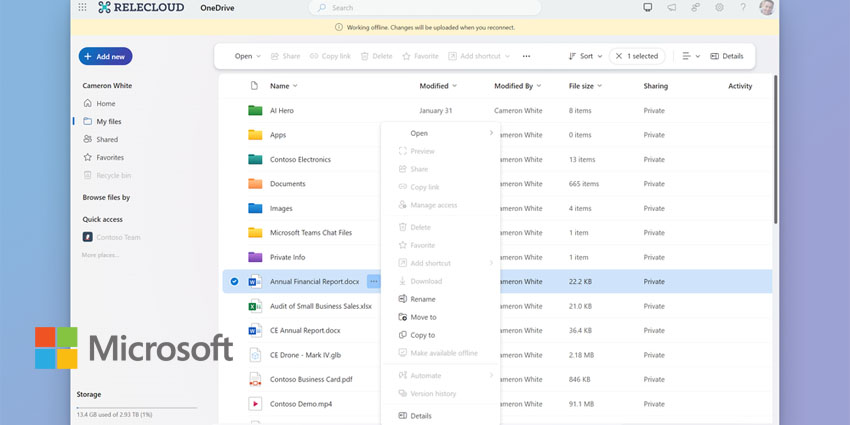
Microsoft is upgrading OneDrive with several new significant offline capabilities to boost productivity and collaboration.
The new features can be grouped into two categories: those that support users when they are offline and those that support them when they are online but wish to proactively prep for more effective offline working.
The former capabilities include opening and interacting with OneDrive’s “Home”, “My files”, “Shared”, “Favorites”, “People”, and “Meeting” views, as well as opening locally stored Office and non-Office files in their native app to make and save edits. The latter features users being able to designate specific files or folders for offline access directly from the OneDrive web interface.
Andrey Esipov, Principal Product Manager in OneDrive and Microsoft Lists Products at Microsoft, wrote in an accompanying blog post:
Last October we updated OneDrive for web with a number of new features and enhancements to help you swiftly retrieve your files and content no matter where they live in your organisation. Continuing with our ambition to give you simple and fast access to your files, we’re now launching offline mode, which brings both significant speed improvements and offline capabilities when using OneDrive in your favourite browser."
Users must ensure they have the latest OneDrive sync app on their Windows or Mac computer to activate offline mode. Logging in to OneDrive for the web in Microsoft Edge or Google Chrome triggers a one-time setup. Once enabled, users can access OneDrive and perform tasks offline, like browsing, organising, and editing files. Changes made offline sync when they reconnect to the internet. They can toggle offline mode in OneDrive settings as needed.
Offline mode is rolling out now worldwide to OneDrive work and school users.
More Details On The New Features
Offline mode in OneDrive offers a range of capabilities when internet connectivity is unavailable. Users can access and engage with various views, including "Home", "My files", "Shared", "Favourites", "People", and "Meeting". Detailed metadata such as file owner, size, recent activity, and last open date are readily accessible.
Moreover, users can manage files efficiently by renaming, sorting, moving, or copying within the "My files" view of OneDrive for web, with changes syncing automatically upon reestablishing an internet connection.
The functionality extends to opening and editing locally stored Office and non-Office files in their native applications. Microsoft suggests this feature is invaluable for maintaining productivity in environments with erratic or absent internet access.
Offline mode in OneDrive also introduces new capabilities when users are online. They can designate files or folders for offline access directly from OneDrive for web and optimise local storage by converting files to online-only status.


