

Vendor: Mitel
Call Manager: MiCloud Office
Deployment Options: UCaaS only, Public Cloud, Multi-tenanted
Mitel released MiCloud Office in the UK in December 2015 as a multi-tenanted, unified-communications-as-a-service solution (UCaaS) to their channel partners.
MiCloud Office was originally developed by Telepo, who in 2014 was acquired by Aastra. Mitel then acquired Aastra later that year and inherited Telepo's unified communications as a service (UCaaS) platform.
To say they inherited it doesn't do the product justice. In fact the Telepo product (MiCloud Office) is potentially now Mitel's breakthrough cloud product.
MiCloud Office is built on a price per seat, per month model. All you need is a good internet connection, we're glad to say there are very few complexities with this product.
How the review works
In this review we'll be brushing over the detail and sticking primarily to the headline features and benefits of this cloud phone system. We apologise if any information is incorrect, however we endeavour to produce a high quality review of the MiCloud Office product.
Our intention is to give you an independent viewpoint of this product and we'll insert links where we can to other related content so you can expand your search even further.
In terms of consistency across our product reviews, we stick to a set structure to ensure we don't miss anything out. However if you spot something that doesn't 'ring true' then please comment and we'll adjust this article up as we go along.
System apps
You can pretty much divide a telephone system's anatomy into two main parts; system wide features and user apps. We'll start with system side features:
Management: You access the system programming using a web browser. The web portal is cloud based and is secured using a username and password. Different user rights can be configured depending on the role of the individual requesting access.
Voice Messaging: All aspects of voice messaging are embedded into the core platform. Depending on what licenses you choose, you'll receive:
- Individual and Group voice mail boxes
- Voice mail to email forwarding
- Auto Attendant (also known as IVR)
- Call queuing announcements
Audio & Web Conferencing: In-built is a voice conferencing system, therefore you can configure a direct dial in (DDI) number for the conference bridge and use it for dial-in conference calls. In addition, you can setup an ad-hoc conference call from your desk phone or app.
The MiCloud Office desktop application now supports screen sharing and video conferencing. You'll need a web cam on your PC/laptop or Mac device. If you have the app on your smartphone or tablet you can setup and access conferences from these too.
Call Recording - Call recording is currently not supported. However we understand its in the pipeline for 2017, so available sometime soon.
Call Reporting - Call reporting (also known as call logging software) is available as part of the package. It comes at no extra cost for the entry edition of MiCloud Office Analytics. The entry edition may or may not meet your needs so be sure to explore the feature comparison before purchasing.

Contact Centre - Call centre functionality is generally required in most businesses nowadays and MiCloud Office delivers. If you're seeking ACD agents, hunt groups, call queuing and MIS reporting to help you run your busy sales team or customer service department, then you're on a winner.
To enable the ACD features you'll need the appropriate licence for each user however once enabled you can choose to operate your contact centre from any device, anywhere. This is a superb example of contact centre as a service (CCaaS) technology for the modern business.
Multi Media (omni-channel) - Sadly no support for multi-media just yet. Voice calls only.
WFO - No features available for workforce optimisation. However for less formal call centres you may find just what you need built into the MiCloud Analytics reports.
Automated Dialling - All users can enjoy the click to call functionality built into the MiCloud Office client software for PC (not currently supported in the Mac client). However there is no preview dialling, power dialling or predictive dialling option. You would have to investigate 3rd party options for this kind of horse power.
CRM Integration - Connecting your CRM software is becoming more popular than ever before. Most PBX vendors offer support for the main stream CRMs and if they don't they'll point you in the direction of a 3rd party plugin that will.
There is no native CRM support in MiCloud Office, however Mitel recommend Tenfold CRM integration which will help you connect everything together.
API - There is a software developers kit (SDK) available for MiCloud Office.
User Experience
Reception Console - There is an attendant console license available for receptionists. Mitel call it Attendant View. It's purposely designed for receptionists and its neatly packaged up in the same MiCloud Office client software for Microsoft Windows and Mac. You don't need to use a desktop telephone either, you can run it in softphone mode if you prefer.
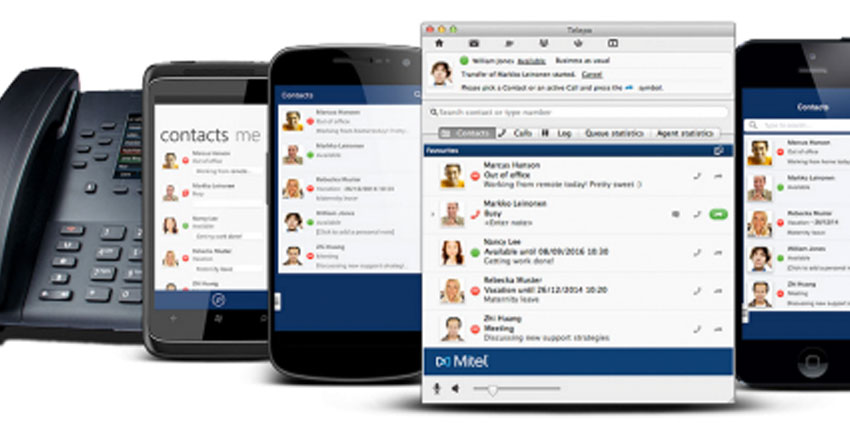
UC Desktop Client - The unified communications (UC) client is really impressive on MiCloud Office. It comes as a single installation file for Microsoft Windows and depending on the licenses you choose, it can turn from it's standard view into an ACD agent interface or Attendant View for receptionists. In addition, it can work as a VoIP soft phone or it will work with your desktop telephone.




