
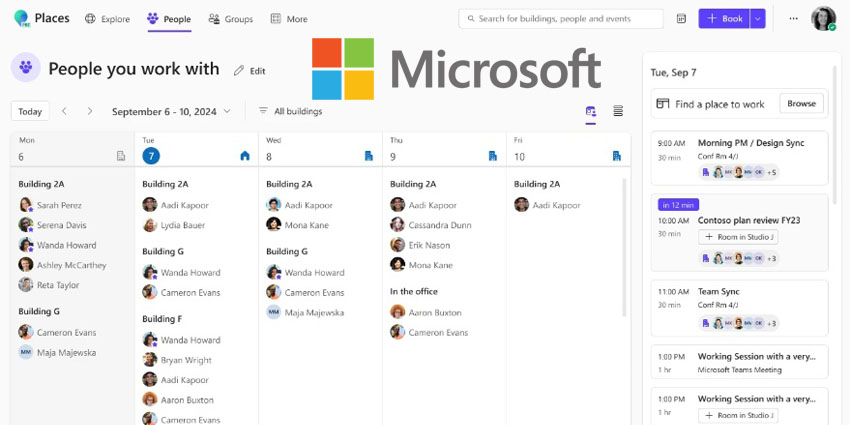
Microsoft has launched an AI-powered "Places" app to facilitate seamless flexible working and workplace management in the hybrid era.
Intending to address the challenge of encouraging productive and rewarding flexible working that benefits workers and employers, Places intends to make coordinating in-office time and collaboration more efficient.
Jared Spataro, Corporate Vice President, AI at Work at Microsoft, wrote in an accompanying blog post:
With Microsoft Places, an app that reimagines flexible work, AI can make coordinating in-office time and connecting with coworkers even easier(...) In addition to fostering improved coordination and connection, Places optimizes the effectiveness and engagement of the workplace."
Places features are accessible across commonly used platforms like Outlook and Microsoft Teams, enabling flexible work coordination and connection within a user's regular workflow.
"Scheduling in-office time with coworkers and planning ahead to book rooms and a desk are regularly cited challenges for flexible teams," Spataro added. "When employees get to the office, they don’t want to be greeted by a sea of empty desks—they want facetime with their manager and the coworkers they collaborate with most frequently. Nearly half (49 percent) of global knowledge workers have struggled with this situation over the past year."
Places is now available in Public Preview. It will eventually be included in Microsoft Teams Premium, currently available at a promotional price of $7 per user per month (usually $10 extra).
More Details on Places' Feature Set
Among Places' most eye-catching features is the "location plan", which allows users to set and share their proposed location schedule with coworkers and view their plans as well.
Updating or adjusting a user's location is always available within the Places app and accessible in their regular workflow through the Outlook Calendar. With a click, users can change their schedule, access the peek card—which shows their closest collaborators planning to come in—and quickly book spaces. The peek card also includes a link to view all coworkers' schedules in the Places app.
In addition to coordinating schedules with coworkers, users can see their manager’s schedule expectations. Managers can leverage team guidance in Places to communicate which days their team should be in the office and the priorities for each in-office day. Microsoft suggests this purpose-driven approach gives users an additional reason to visit the office.
Integrating Places data into Microsoft Copilot will make coordination even more manageable. Starting in the second half of 2024, users can use Copilot to determine the best days to come into the office.
Copilot will provide reasons for its recommendations, such as in-person meetings, the manager’s attendance, or most coworkers being in the office. Users can ask Copilot to adjust their schedule based on this information, change their work location to the office on recommended days, and reschedule in-person meetings.
- Google Worries Catalysed Microsoft’s OpenAI Investment, Emails Say
- The EU Is Set to Issue Antitrust Charges Against Microsoft, Sources
What About Booking Desks and Spaces?
After deciding on office days, users can leverage Places as an end-to-end booking solution for identifying appropriate meeting spaces and focused work, starting with the Places Finder in Outlook. Users can search for rooms and desks, receiving additional details to guide their booking decisions. The Finder displays images, maps the location, and lists available technology or amenities.


