
Microsoft Teams has introduced a new channel experience to enhance worker productivity and collaboration.
Now generally available in both the classic and new Teams client, the revamp was inspired by Microsoft noticing that many customers were not using channels to their full capacity, so applied user research, customer feedback and communication platform trends to improve the collaborative channels experience.
Noga Ronen, Senior Product Marketing Manager at Microsoft, said:
Getting things done successfully in a fast-moving workplace requires teams to work closely together and operate off the same information(...) The new channels experience, now generally available in classic and new Teams, makes it easier to focus on key topics, engage with the right stakeholders, and find specific information so your team can accomplish more together."
The new channel experience is enabled in all channel variations, such as standard, private, and shared channels.
How Exactly Does the New Channels System Work?
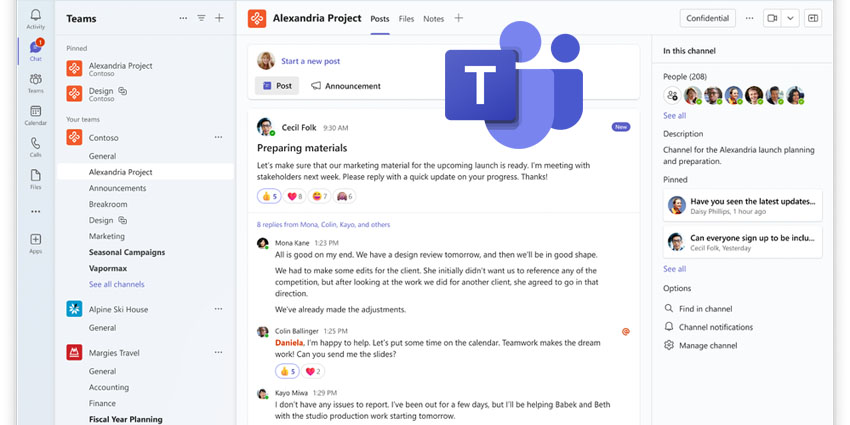
Channels' new conversation view enables colleagues to pinpoint which channel topic and conversation to centre on. Users can scan the conversation, return whenever they want to find content and reply directly to a thread, identically to a chat. Users can pop out the post to monitor the conversation while focusing on other work. Pinning a post will highlight its significance to the channel's members and allow users to return to it for future reference.

Users can choose to see recent posts or the compose box at the top or bottom of a channel, aiding users to catch up on the latest conversation, engage in the discussion or start a new one. Channels will initially default to presenting the most recent posts and compose box at the bottom, but users can change the order by selecting "See new posts at top" in the channel settings.

The updated compose box experience streamlines the user experience, allowing workers to collaborate with their team to produce a post to discuss a specific topic in the project or deliver an announcement to underline a milestone or significant piece of news.

Teams has simplified the channels' information pane to offer a clear outlay of important channel information and provide valuable context, including the channel's description, member list and pinned conversations.




