
In this Monday.com review, we're taking a deep-dive look at one of the most popular cloud-based platforms for customer, team, and project management. Starting life as a basic work collaboration tool in 2014, Monday.com has emerged as a market leader for digital work.
The comprehensive cloud-based suite includes tools for workforce, project and task management, marketing, developer tools, and beyond. As a customizable platform, Monday.com can adapt to your business needs.
We've spent plenty of time experimenting with Monday.com in the past and even use it to manage many of our day-to-day projects. Here's everything you need to know if you're considering investing in Monday.com for your business.
Quick Verdict: Pros and Cons
Ultimately, Monday.com is a powerful and versatile toolkit, ideal for busy teams. It has diverse features to suit every business and is highly customizable. We use Monday.com regularly at Today Digital and consider it a valuable solution for digital work.
Pros:
- Affordable pricing with a free plan for small companies
- Modern, intuitive, and highly visual dashboard
- Customizable with dozens of templates for beginners
- Excellent customer support
- Integrations with a variety of third-party apps
- Excellent CRM solutions
Cons:
- Pricing structure can be a little complicated
- Some features are restricted to more expensive accounts
Monday.com Review: What is Monday.com?
Let's start this Monday.com review with a quick definition. Monday.com is a cloud-based platform for work management. It's one of the most flexible toolkits for modern workforces, offering solutions for all kinds of teams. You can use Monday.com to support your sales, marketing, project management, operations, and IT teams. Plus, it has its own CRM.
The beauty of this solution lies in its flexibility and ease of use. You can access the tool as a web app or on a mobile device, and you'll gain access to an ultra-versatile dashboard for all kinds of workflows. You can create dashboards for tracking teams, share files and forms, and even set up comprehensive workflow automation.
Monday.com's product portfolio includes three core tools:
- Monday work management: Comprehensive tools for managing tasks and processes in the workplace. This provides resource, portfolio, and task management tools, goals and strategic solutions, requests and approvals, business operations automation, and more.
- Monday sales CRM: A robust customer relationship management solution for lead capturing and management, contact management, customer onboarding, team tasks and projects, marketing activities, and more.
- Monday product development: An R&D toolkit with roadmap planning, sprint management, bug tracking, release plans, and project management.
Monday.com Review: The Core Features
As we mentioned at the start of this Monday.com review, Monday is a highly flexible platform suitable for various workflows. It's ideal for customer relationship management, software development, project management, and optimizing human resources.
The core features of the platform include:
Dashboards
Dashboards are one of the core central features of Monday.com. They can be customized (Without code) with over 50 widgets and apps, providing real-time tracking capabilities and high-level overviews to business users. Monday's dashboards ensure you can view your data however you choose with visual reports, and make decisions based on your insights.
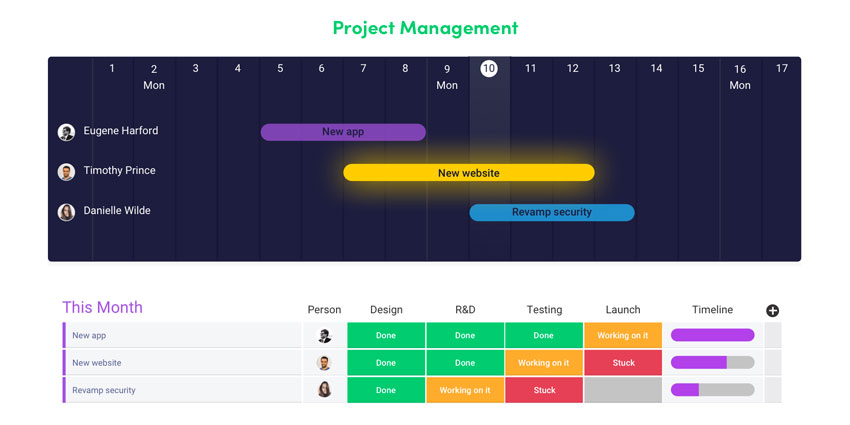
The widgets for Gantt charts, workload tracking and time tracking also make it easy to manage your team and projects in one convenient place. Gantt charts are also available throughout Monday.com to help you view entire projects at a glance, with timelines and task ownership.
Integrations
Ideal for the future of work, Monday.com's ability to connect with countless tools and services ensures you can minimize context-switching for teams. The solution integrates with Microsoft Teams, Outlook, Slack, Gmail, and more than 200 other pieces of software.
Moreover, Monday.com allows you to create automated workflows through those synchronized tools. You can schedule notifications, automate emails, and track approvals in seconds.
Automation
Speaking of automation, we were particularly impressed by the automation options in our Monday.com review. The platform lets you set up custom notifications, date reminders, and handovers in seconds. You can automatically assign tasks to team members and design custom workflows with a drag-and-drop code-free builder.
Plus, since you can assign roles to specific team members in the admin environment, creating unique experiences for your employees based on their needs is easy. You can even automatically track the time users spend on specific tasks.
Gantt Charts and Kanban Boards
Kanban boards and Gantt charts are two of the significant features of Monday.com. With Gantt charts, you can easily keep track of milestones and visualize essential dates and timelines for your workloads. You'll also be able to import spreadsheets into Monday.com from Excel.
Kanban boards are drag-and-drop customizable boards that allow you to sort tasks into different groups. This makes it simple to visualize your entire workflow in seconds. Plus, the boards come with valuable real-time data analytics. Both charts and boards on Monday.com come with support for timelines and dependencies to help organize your workload.
Collaborative Work Docs
Monday.com work docs help you harness the power of collaboration in real time through the cloud. Users can edit and create content in real time, share comments, brainstorm, and even create meeting summaries in seconds. You can also convert sections of docs into action items with a couple of clicks.
Since Monday.com also supports guest and client access, you can collaborate with external contacts in the same place. There are even tagging options, live update notifications, and board integrations for any of your Monday.com boards.
File Management
With Monday.com, users can manage their files and assets in the same collaborative space. The file-sharing system supports custom permissions, secure file storage versioning, and live annotations. Plus, there are a range of customizable templates for various files.


