
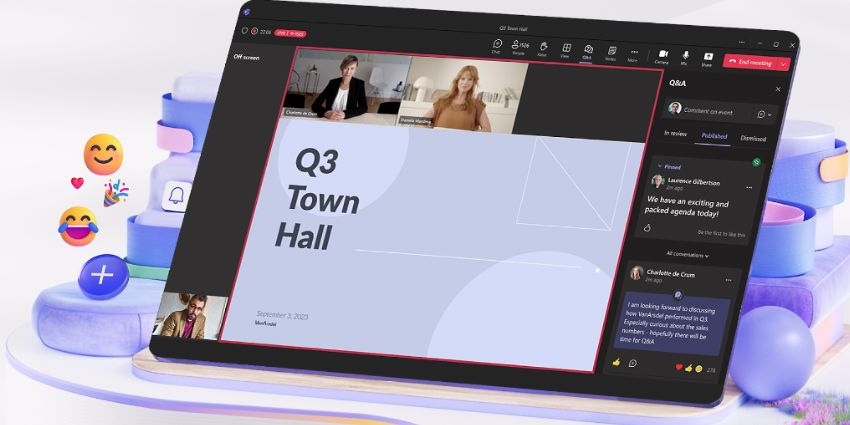
There’s more than one way to host a conversation in Microsoft Teams. Alongside one-on-one calls, video conferencing sessions, and group meetings in Microsoft Mesh, you can also host “professionally produced” and polished events with Teams Rooms Town Halls.
Introduced to replace the previous Teams Live Events offering, Teams Town Halls are the slick, broadcast-style next step for massive all-hands meetings. They’re designed for large-scale communication, connecting up to 20,000 attendees.
They also come bundled with handy features that enhance every stage of the event management process, from planning to delivery to assessing metrics after the fact. With Teams Rooms Town Halls, users can even access DVR features (pausing, skipping, and rewinding events).
Here’s why Town Halls within Teams are well worth exploring.
What Are Microsoft Teams Rooms Town Halls?
Town Halls in Microsoft Teams are structured, large-scale virtual events made for businesses that need to talk to a lot of people at once. They’re the successor to Teams Live Events, which Microsoft began phasing out in late 2023.
Town Halls offer a better experience for both organizers and attendees, with more control over the event, clearer roles, and smarter tech behind the scenes. Companies can schedule a Town Hall right from Microsoft Teams or Outlook and assign presenters, producers, and moderators. They can also issue links to events to attendees anywhere, allowing them to join in without downloading anything.
They also work with Teams Rooms. This turns your standard conference room into a mini studio. You can run the Town Hall from a dedicated space with high-quality cameras, directional microphones, multiple displays, and intelligent speaker tracking. It’s ideal for panel discussions or hybrid events where part of your team is in-person, and the rest is remote.
Notably, Teams Town Halls aren’t the same as meetings and webinars. Meetings are great for fast-paced collaboration, and webinars add a little structure and new features (like moderated chat). Town Halls are presentation-first events built for scale.
The Features of Microsoft Teams Rooms Town Halls
Teams Rooms Town Halls are designed to make hosting large-scale events smart and simple. The solution is available to anyone with a Teams Enterprise or Teams Premium license. However, a Premium license provides a higher audience capacity and support for more concurrent events.
Features include:
- Tools for planning events and customizing invitations
- On-demand recording (with custom recording policies)
- Attendee reporting and event performance insights
- Virtual green room for collaboration
- RTMP management
- Enterprise Content Delivery Network integration
- Real-time event analytics (with Teams Premium)
- Moderated Q&A, and live translation for captions
- Enterprise-grade security and role-based permissions
- Audience reactions and interaction features
Attendees can join from pretty much anywhere: Teams desktop, mobile, browser, or video-enabled meeting rooms. Presenters can switch between shared content, camera feeds, or pre-recorded video without missing a beat. Plus, Microsoft is currently upgrading this toolkit with more features.
Recently, the company introduced the new DVR features, which allow attendees to pause the stream, rewind to catch something they missed, or jump back in live. Device capabilities have also been expanded to support presenters and attendees on MTR-W, CVI, and VDI.
The Benefits of Microsoft Teams Rooms Town Halls
There are plenty of ways to communicate in a workplace. Emails. Slack threads. Regular Teams meetings. But when you need to bring together hundreds (or thousands) of people for something important, Microsoft Teams Rooms Town Halls offers some unique benefits.
Scale Without Sacrificing Quality
With a Teams Premium subscription, you can host up to 20,000 live attendees per town hall. Even the standard Enterprise base license supports 10,000 attendees. You’ll also be able to run up to 50 concurrent events (with Teams Premium), without compromising on quality.
Microsoft’s infrastructure ensures these events are designed to handle volume without glitchy audio, pixelated video, or unnecessary complexity. You can even keep the “branded” element consistent, with customized invitations, event recording emails, and moderated chat boxes.
Plus, you maintain comprehensive control, with eCDN integrations (from both Microsoft and third-party vendors), and filters to control exactly what attendees see.
Pro-Level Production with Teams Rooms
Let’s say you’re hosting a quarterly update. You’ve got the CFO, the VP of Sales, maybe a product lead, all in one meeting room. With Teams Rooms, that space becomes a studio.
Multiple cameras let you cut between speakers. Intelligent speaker tracking means the camera follows whoever’s talking, automatically. The microphones isolate voices, block out distractions, and boost clarity. It feels tight, polished, and professional. Even if someone’s watching from their phone, they get the same professional experience.


