
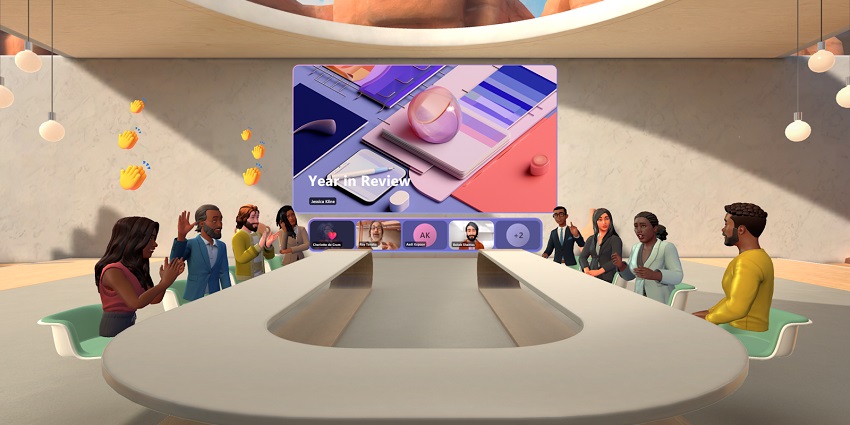
Introduced at the Microsoft Ignite event for 2023, Microsoft Teams Immersive Spaces have the potential to change the way we work and collaborate forever.
Created as part of Microsoft's ongoing strategy to provide businesses with tools that boost engagement and inclusivity, Immersive Spaces are a new way to synchronize staff for the future of work. Infusing Microsoft Mesh, Microsoft's extended reality platform, with Azure technologies, Immersive Spaces allows companies to create and explore custom virtual workspaces.
Businesses can use the technology to build three-dimensional spaces where team members can interact through digital avatars, share knowledge, and leverage co-presence benefits.
According to Microsoft, the offering addresses companies' ongoing issues when embracing remote and hybrid work. Around 43 percent of business leaders now say they struggle to build and preserve employee relationships as workforces grow more distributed.
Here's everything you need to know about Microsoft Teams Immersive Spaces and how they can empower, align, and support today's teams.
What is Microsoft Teams Immersive Spaces?
Microsoft Teams Immersive Spaces are three-dimensional environments where team members can share information, represent themselves with customizable avatars, and simulate face-to-face interactions. They bring the power of "Mesh," Microsoft's XR solution, into the Teams workplace, allowing users to transform virtual meetings into metaverse experiences.
In an era defined by flexible work, the demand for "immersive collaboration" solutions is growing. Teams distributed in hybrid and remote workforces still need to connect with their colleagues in a productive, agile environment to enable constant innovation and growth.
Since the pandemic, 92 percent of HR experts believe immersive technology, such as metaverse environments and extended reality tools, is crucial to aligning teams. With Immersive spaces, users can achieve new levels of "co-presence" by interacting via avatars regardless of whether they're using the standard Teams app or connecting through a Quest headset.
According to Microsoft, Immersive Spaces (Available as part of the Teams public preview program) help to enhance employee relationships and encourage creative, collaborative work. Microsoft believes these spaces will be ideal for:
- Weekly standups or scrum sessions with teams.
- Brainstorming sessions (with multiple breakout groups)
- Casual get-togethers, team-building exercises, and celebrations.
- Virtual networking opportunities.
- Onboarding and meet-and-greet sessions for new team members.
The Features of Immersive Spaces on Teams
Microsoft Teams Immersive Spaces is one of the core components of the tech giant's comprehensive strategy to make digital workplaces more engaging and collaborative. In recent years, the company has introduced various solutions for immersive collaboration, now available in the Immersive Spaces landscape. For instance, users can access:
Impressive 3D environments
In the past, features like Microsoft's "Together Mode" for Teams helped to promote feelings of inclusion in remote and hybrid meetings, with a shared sense of presence. Microsoft Teams Immersive Spaces takes this concept to a new level.
Users can access ready-made virtual environments to suit their specific purpose, whether a large gathering or an informal discussion. Users can move around these spaces using their VR headsets or computer keyboards.
Spatial audio
Building on the spatial capabilities introduced for Teams, Immersive spaces will enhance communication with carefully-positioned audio signals.
Microsoft is even using "spatial audio zones." This ensures multiple staff members can collaborate in simultaneous breakout sessions and discussions without interrupting other groups. These zones allow users to walk around different parts of a 3D space and participate in various conversations.
Customizable 3D avatars
Introduced as part of Microsoft Mesh, Teams virtual avatars allow users to create digital versions of themselves for participation in immersive meetings. Users can use their existing 2D avatars for Microsoft Teams or create new avatars for Immersive Spaces.
Today, users have more opportunities to customize their avatars to suit their specific needs, with options to change appearances, outfits, and more based on need or mood.
Live reactions and emojis
Like in standard Microsoft Teams meetings and presentations, users can express themselves using live emojis, such as the "heart" or "thumbs up" reaction. This gives Microsoft Teams Immersive Spaces members a unique way to respond to information without interrupting presenters.
Users can access live reactions, emojis, and other meeting tools within their dashboard on Microsoft Teams and through the Quest VR headset dashboard.
Seating arrangements
Business leaders and individual employees will have the opportunity to choose specific seating positions during an immersive session. Users joining Microsoft Teams Immersive Spaces through Teams or using a VR headset can control their position in any environment.
Additionally, people can move around at will within an immersive room, walking to other team members, standing up or sitting down when necessary, and more.


