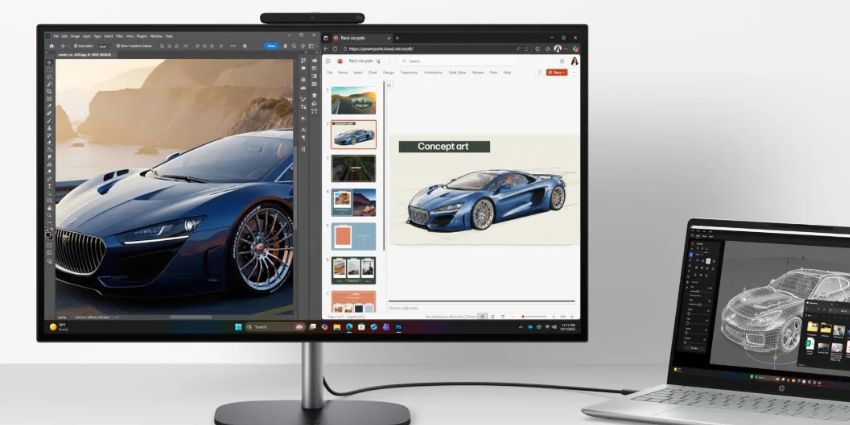

HP has given its all-in-one OmniStudio X desktop a rethink for hybrid work. The 27-inch model now features a tiltable webcam that can show your desk during calls, along with upgraded processors and a new Nvidia GPU.
Announced at CES 2026, these changes aim to make collaboration smoother, whether users are presenting sketches, documents, or prototypes. The updates also include features like Thunderbolt Share, which simplifies moving large files between devices.
These updates highlight a broader shift in desktop hardware. Manufacturers are beginning to focus on features that address the realities of hybrid work, not just raw performance.
Desktop Collaboration Reconsidered
The most notable addition is a built-in webcam that can tilt downward to capture the user’s desk. This allows users to show sketches, handwritten notes, physical documents or prototypes during calls without relying on a second camera or makeshift solutions.
Hybrid workers often face challenges with standard webcams.
Professionals who need to present physical work often hold items in front of the camera or switch devices mid-call. This can disrupt meetings and reduce clarity.
By adding a tiltable webcam, HP recognises that hybrid work often involves both digital and physical content.
Educators, designers, and consultants may find this feature particularly useful. Users who work entirely digitally may find it less relevant, but it demonstrates a shift toward desktops designed to support practical collaboration.
Hardware and Performance Updates
The updated OmniStudio X also includes several hardware improvements. The 27-inch model now offers Intel’s next-generation processors alongside Nvidia’s RTX 5050 GPU. The GPU provides discrete graphics with 8GB of VRAM. It is not intended for high-end creative tasks such as advanced 3D rendering or intensive video editing.
HP also offers all-AMD and Intel-only OmniStudio models with integrated graphics. These are aimed at users whose workloads do not require powerful visual performance. Both 27-inch and 23.8-inch models are available.
There are a few trade-offs. The previous 27-inch OmniStudio X had a 4K display, but the updated model now uses QHD resolution. HP has not confirmed whether the larger 31.5-inch OmniStudio X will also be updated.
Connectivity and Workflow Features
The OmniStudio X now supports Thunderbolt Share. Two Thunderbolt 4 or 5 PCs can connect via a single cable. Users can drag and drop large files between devices quickly and directly.
This effectively turns the desktop into a collaboration hub. Laptop users can connect to the OmniStudio X to use its display, webcam, and peripherals. They can also move files without relying on cloud storage or external drives.
This feature could reduce friction in shared workspaces. Hot-desking or open office environments may benefit, but organisations will still need to consider security and access policies.
Implications for Workplace Technology
The OmniStudio X updates highlight a shift in desktop design for hybrid work. Performance improvements remain modest. The emphasis is on features that improve collaboration and daily workflows. Tools like the tiltable webcam and Thunderbolt Share aim to remove small but persistent obstacles in meetings and file-sharing.
The usefulness of these features depends on role and workflow. Professionals who often present physical content may find the desk-facing camera valuable.
Teams that frequently transfer large files could benefit from Thunderbolt Share, but several open questions remain.
The reduction in display resolution, the uncertainty about larger models, and the lack of pricing or release dates leave gaps for organisations evaluating the system.
Despite this, the OmniStudio X shows how desktops are evolving beyond raw performance. They are increasingly designed to support hybrid work and reduce friction in real-world tasks.
The OmniStudio X does not reinvent the desktop, but it demonstrates how hardware is beginning to adapt to the way people actually work today.