
Most business leaders are already convinced that XR works in the enterprise. They’ve seen the market growth, the case studies about faster learning and development, and the productivity boosts. Still, many are missing one thing that could shape faster adoption and approval: accessibility.
Some XR devices do have an inclusivity problem. They’re designed for quiet rooms, people with sharp eyesight, and endless focus. Still, there are a growing number of options out there that can actually improve how work feels for those of us with hearing, vision, or cognitive concerns.
That matters because accessibility issues aren’t rare. Nearly 2.5 billion people are expected to experience some level of hearing loss by mid-century. Dyslexia alone affects roughly one in ten people in the UK. Over 4 billion people wear glasses.
XR doesn’t automatically fix those things, but when it’s deployed strategically, it can level the playing field better than a lot of other tech.
Related articles:
Why XR & Accessibility in the Workplace Matter
Accessibility problems aren’t rare; they’re just hard to measure.
Most workdays are full of small breakdowns no one logs as “accessibility issues.” The warehouse is louder than usual. The lighting’s bad. Someone’s on hour ten of a shift, and their brain just won’t hold another set of instructions. A new hire freezes because the system moved faster than they expected, and now they’re behind.
All of it shows up in performance.
People don’t even need to be diagnosed with a medical issue to face accessibility issues. Look at noise. OSHA’s own guidance puts sustained risk at 85 decibels. Plenty of real workplaces blow past that without blinking. In those conditions, audio-only guidance fails immediately. People stop asking questions. They guess. They work around the tool.
Vision is just as slippery. Screen fatigue isn’t theoretical. Depending on the study, somewhere between half and nearly all desk-based workers report eye strain during long shifts. Add safety glasses, glare, or low light, and suddenly that crisp interface from the demo feels like work you don’t need.
Cognitive load is harder to talk about because it sounds like someone admitting they can’t keep up. Really, it’s just work. Deadlines stack. Tasks overlap. You’re switching gears all day. You get tired. Stuff you know how to do suddenly takes longer to surface. Gallup’s data keeps circling the same reality. When people are burned out, they check out faster, mess up more often, and leave sooner than they expected to.
How Can XR Improve Workplace Accessibility?
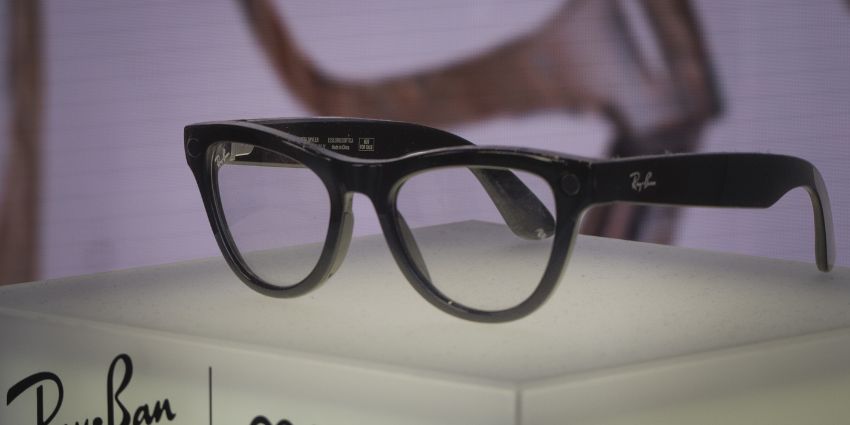
XR devices aren’t perfect, but they give people options they didn’t have before. Live captions on smart glasses when hearing isn’t reliable.
Voice guidance when visuals aren’t doing the job. Clear, visual step-by-step cues in VR or mixed reality when written instructions just don’t stick. That’s where XR earns its place. Not by being impressive, but by making work easier to follow in the moment.
Hearing Inclusion: How Can XR Help Employees With Hearing Impairments?
People with hearing loss aren’t the only ones who struggle with audio-only guidance. Anyone who’s worked around machines knows this already. Or forklifts. Or alarms. Or just a busy space. Speech gets chopped up. Half of it disappears. Safety research keeps landing in the same place. Misheard instructions lead to rework and incidents. Sometimes small. Sometimes not. Turning the volume up doesn’t really solve it. Giving people another way to catch the message does.
Real-time captions and visual prompts change outcomes because they give people a second channel. When Boeing introduced AR guidance for complex aircraft wiring, technicians completed tasks 25% faster and with fewer errors. The big win wasn’t the graphics. It was clarity. People didn’t have to stop, ask, or guess.
Vision Inclusion: How Can Immersive Technology Support Workers With Visual Impairments?
For people with vision concerns or those working in low-light conditions, AI voiceovers aren’t the only thing an XR system can deliver. Older XR headsets used to accidentally create visual scavenger hunts with floating panels and tiny text.
Newer wearables tend to be equipped with spatial anchoring to avoid that. Spatial anchoring flips that. Instructions tied directly to the object cut visual search time dramatically. In field maintenance pilots across utilities and manufacturing, AR-guided inspections routinely report 20–30% reductions in task time, largely because workers stop hunting for the “right” step.
Cognitive Inclusion: What Cognitive Accessibility Benefits Can XR Provide?
Under pressure, working memory drops.
Step-by-step guidance, confirmation prompts, and adjustable pacing reduce that load. PwC’s large-scale VR training study found learners completed training up to four times faster than classroom-based methods, with significantly higher confidence in applying skills. Speed mattered, but confidence mattered more. People trusted themselves afterward.
XR devices can also cut down on multitasking. Instead of having to press buttons, employees can use systems with ambient intelligence that respond naturally to gestures, eye movements, or speech. That has a huge impact on cognitive load.
The Extra Benefit: How Accessibility Improves Adoption
A lot of companies looking at XR & accessibility today aren’t just trying to build a more inclusive workplace; they’re trying to make sure their immersive pilots actually pay off.
When XR adoption slows down, people love to blame the tech. Headsets are too heavy. Software’s immature. Battery life isn’t there yet. That story is comforting because it suggests waiting for better tools will fix everything. Really, what tends to derail adoption is comfort.
People feel uncomfortable using headsets, their work slows down, and they’re nervous about speaking up in case they get singled out.
You can see this pattern across enterprise tech, not just XR. Gartner found that only 48% of digital initiatives ever meet their original business targets. The rest just fade out because usage and adoption are inconsistent. A focus on XR & accessibility means you design initiatives that are more likely to pay off, because you focus on:
Comfort
VR sickness isn’t rare. A 2024 paper in the International Journal of Industrial Ergonomics flat-out says 50% to 80% of people experience cybersickness when using VR content. That range is wide, but it matches what happens in the field. You don’t need a disability to get knocked sideways by motion mismatch. You just need a headset, a moving scene, and a busy day.
So yes, teleport vs smooth locomotion is an adoption decision. Stable horizons are an adoption decision. Seated and standing modes are an adoption decision. XR accessibility workplace design means accepting that bodies are part of the interface.
Clarity
Most XR UX fails the same way bad onboarding fails: it dumps everything upfront and calls it “context.” People don’t need the whole manual floating in their face. They need the next step. Progressive disclosure, plain language, UI scaling, contrast presets. This is Inclusive XR doing basic respect work. It reduces visual search, cuts hesitation, and makes competence feel achievable.
And captions aren’t niche, either. A major Verizon Media/Publicis survey found 69% of people watch videos with sound off in public, and 80% say captions make them more likely to finish. If captions keep attention on TikTok, they’ll keep attention on the shop floor.
Control
Control is where trust lives. “Pause, rewind, resume” sounds small until you realize W3C accessibility guidance treats timing and pause controls as core requirements for people who need more time to read, process, or act.
Also, wearables raise a different kind of accessibility question: psychological safety. Stanford’s VR lab showed motion tracking can identify 95% of users in a pool of 511 with under five minutes of data. If people think the headset is quietly profiling them, adoption dies. Recognizing these things in advance is how you design a program that can scale.
Discover:
- Enterprise XR: Pain Points and Solutions
- VR vs AR vs MR: Which is Best for Your Business?
- Step-by-Step: How to Integrate XR into Your Business
How Should Organizations Design Inclusive XR Experiences?
Teams fall in love with a use case, rush into a pilot, and only later realize the experience assumes everyone is calm, focused, fully able, and having a great day. By then it’s awkward to back out. So people adapt instead. Or they stop using it.
Here’s how you align XR & accessibility for your team.
What to Look For When You’re Evaluating XR
Most major XR players don’t lead with accessibility in their marketing, so you have to look past the headline features. Ask questions that reveal how the experience actually behaves once it’s in use.
- Can someone pause without the system acting like they broke it?
- Can they repeat a step without starting over or losing progress?
- Do captions and visual cues work immediately, or are they buried in menus?
- If audio becomes useless, does the task still make sense?
- When a mistake happens, is there a clear way forward, or just confusion?
This is also where procurement decisions lock in behavior. If accessibility isn’t part of pilot success criteria, vendors optimize for demos, not durability. What gets tested gets fixed. What doesn’t get ignored?
What to Design for if This Has to Survive Real Work
Good Inclusive XR design is all about simplicity, not exciting features.
The experiences that hold up tend to share the same traits:
- Show one thing at a time. People don’t need the whole workflow in their face.
- Anchor guidance to what’s physically in front of them, not floating UI clutter.
- Use language you’d actually hear on the floor, not documentation language.
- Don’t rush people unless the job itself is rushed.
- Make exits, pauses, and recovery obvious so mistakes don’t feel public or embarrassing.
This is really about pressure. Pressure is what causes people to freeze, guess, or quietly give up and work around the tool instead.
Trust and Psychological Safety are Part of Accessibility
Wearables change how people feel about technology, whether we admit it or not. A headset isn’t just another tool sitting on a desk. It’s on your face. It moves when you move. It notices things. Sometimes, where you’re looking. Sometimes how long you’re looking. If people don’t really understand what’s being captured, when it’s happening, and what that information is not being used for, they won’t settle into using it. They’ll stay tense.
Clear rules, visible indicators, and hard boundaries matter if you want adoption. Picture someone tired, halfway through a shift, distracted, maybe already behind. If the experience still helps instead of stressing them out, you’re probably doing XR & accessibility right.
Accessibility & XR: More Connected than You Thought
What’s changed over the last few years isn’t attitude. It’s pressure.
UK job listings referencing neurodiversity have increased sixfold since 2019. Not because organizations suddenly discovered empathy, but because they’re running out of slack. Fewer people. More complexity. Greater demand for tools that actually help.
That context matters for XR.
If immersive tech only works when people are rested, focused, and operating under ideal conditions, it’s fragile. XR accessibility is how that fragility gets fixed.
- Comfort keeps people steady enough to stay engaged.
- Clarity keeps them from freezing when information stacks up.
- Control gives them the confidence to recover when something goes wrong.
That combination is what turns XR into something people rely on instead of tolerate. You end up with an XR strategy that can actually scale, because it’s predictable, forgiving, and respectful of all people.
If you want to see where that path starts, read our guide to extended reality for businesses.
FAQs:
How do you know if XR tech is inclusive?
Can someone use it without feeling stupid, rushed, or uncomfortable? If the experience only works when the room is quiet, the user is fresh, and nothing goes wrong, it’s not accessible. It’s optimistic. Real XR accessibility workplace design holds up when someone’s tired, distracted, or halfway through a bad shift.
Does XR support neurodiverse workers?
It can. Step-by-step guidance, predictable flows, and the ability to slow down remove pressure. Pressure is what causes freezing, guessing, or avoidance. When people know they can pause or recover, they engage more. Confidence shows up before speed.
What accessibility features can XR technology support?
XR systems can offer multiple ways to receive the same information. Captions for spoken instructions, audio prompts for people who struggle with small text, or visual step cues anchored to equipment. Some platforms also let users slow things down, repeat steps, or adjust contrast and text size.
What standards guide accessible immersive technology?
Groups like the XR Association have started publishing guidance, but many companies still rely on traditional accessibility frameworks as a baseline. Principles from WCAG and other W3C work still shape how interfaces handle captions, timing controls, and readable content.
What barriers still exist in accessible XR design?
A lot of XR experiences are built for ideal conditions. Quiet rooms, perfect vision, and users who never get tired. Real workplaces aren’t like that. Motion sickness, cluttered interfaces, and audio-only guidance still create problems.