
We’re all seeing the same “re-runs” at the enterprise digital transformation cinema lately. A company gets excited about XR workplace use cases, runs a pilot, then nothing scales. It’s not that the tech isn’t ready; it’s that a lot of organizations treat XR like a “single project”.
That mindset is getting expensive fast. By 2034, the XR market will be worth over $3261 billion, and it has the potential to generate trillions, from reduced training costs, better customer experiences, lower risks in the workplace, and more. But scaling an XR enterprise strategy starts with focus.
You won’t get far if you try to embrace multiple XR work modes smashed together all at once. Training, collaboration, customer demos, and remote help scenarios are different jobs, with different risks, and different owners. When you blend them, you get confusion dressed up as ambition. Then you hit the predictable walls: cost anxiety and technical complexity.
XR Workplace Use Cases: The Work Modes Enterprises Confuse
Most leaders say they’re exploring XR workplace use cases, but what they’re really doing is shopping for “XR” like it’s a single category. It isn’t. It never was.
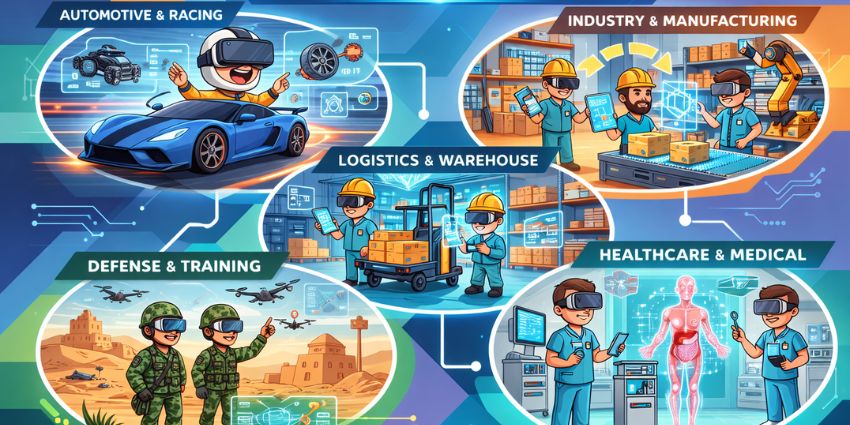
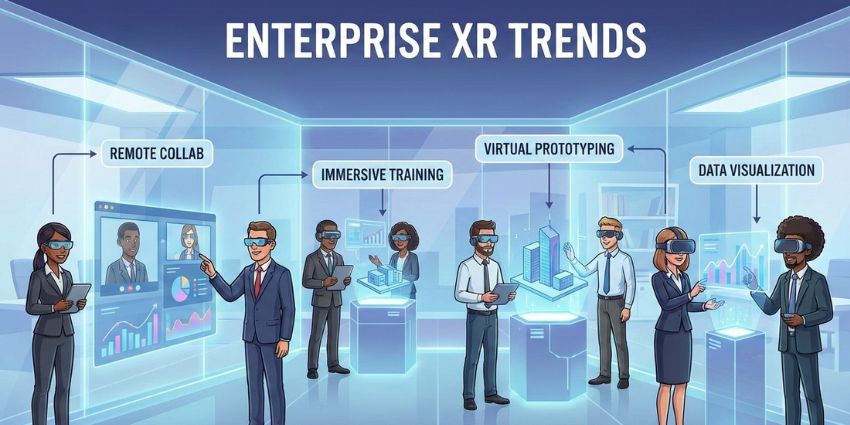
For now, most XR projects fall into the same five distinct categories. Each one has a different buyer. Each one succeeds or fails for totally different reasons. Mash them together, and you get noise. Separate them, and things suddenly make sense.
Our own research has already found XR impact breaking cleanly across training (36%), collaboration (30%), and customer experience (26%), not falling into one universal bucket.
What makes this worse is that internal teams already feel the differences. L&D cares about time-to-competency. Ops cares about error rates and downtime. UC teams care about decision velocity. Engineering cares about iteration cycles.
When one pilot tries to satisfy all of them, nobody gets what they need.
Let’s break the major use cases down.
XR work mode #1: Immersive learning & simulation
This is the mode most companies explore first, and for good reason. When people talk about XR workplace use cases, they’re usually picturing training. Safety drills. Equipment onboarding. Leadership scenarios that are hard to practice without messing something up in the real world.
This mode works when the job demands practice, not reminders.
We’ve all seen the evidence that XR training works. PWC even said that employees trained in VR completed training four times faster than classroom learners, and reported being 3.75× more emotionally connected to the material. That emotional connection matters. It’s the difference between memorizing steps and actually remembering what to do when things go sideways.
You see this clearly in heavy industry. BHP used XR to improve safety culture, not just compliance checklists. Operators could walk through high-risk scenarios, spot hazards, and understand the context of decisions before ever stepping onto a site.
AI is changing things, too. Modern immersive learning platforms can now adjust scenarios in real time, generate new variations automatically, and give personalized feedback without an army of instructional designers.
The trap? Trying to stretch this mode beyond its job.
Immersive learning is about building capability, not guiding live execution. If someone already knows the task but keeps making mistakes on the floor, more simulation won’t fix it. That’s a different XR work mode entirely.
The right success metrics here are boring but honest: time-to-competency, error reduction after training, incident rates, and certification pass rates. If you measure this mode by engagement or “wow factor,” you’re already off track.
XR work mode #2: Assisted reality guidance
This mode exists for one reason: people already know how to do the job; they just don’t do it perfectly every single time. In most operations, “almost right” is usually where costs, delays, and safety issues hide. Look at what actually moves the needle.
Aptus Group rolled out smart glasses in warehouse workflows and saw receiving speed go up 15%, put-away improve 24%, and picking and packing jump 20%.
What’s interesting is how often teams try to solve this problem with the wrong tool. They reach for immersive training because it feels strategic. Meanwhile, the real issue is someone forgetting a step at 2:17 a.m. on a night shift. No simulation fixes that. A quiet, hands-free prompt does.
With companies like Meta, Google, Samsung (and maybe even Apple) investing in more AI-enhanced AR tech right now, we’re on the cusp of major growth in this category. We might even step into a world where smart glasses one day replace the smartphone.
The important thing to remember here is that easy accessibility is everything. If the headset is heavy, hot, awkward, or unreliable, adoption dies. If it doesn’t feel natural to wear and use, or employees don’t trust the AI assistant built in, you won’t get anywhere.
Assisted reality shouldn’t try to change how people work; it should help them make the process feel smoother.
XR work mode #3: Remote expert & telepresence
Remote expert support doesn’t care about immersion. It cares about time. Specifically: how long a machine sits idle, how long a site waits for a specialist, and how much money burns while everyone’s on hold. When people talk about XR workplace use cases delivering “real ROI,” this is usually what they mean.
A few years ago, Sanovo used a HoloLens-based remote support setup to connect field technicians with experts who weren’t on site. Repair jobs that used to take two days dropped to a few hours. New devices, like Meta’s AI and AR-powered smart glasses, will make similar gains more accessible to a wide range of companies.
Remote expert and telepresence options won’t necessarily be the most “immersive” example of XR in the workplace, but they’ll be valuable. Part of what’s driving adoption is scarcity. Experienced technicians are harder to find, harder to move, and increasingly spread thin.
Some researchers expect XR hardware used in after-sales and service environments to jump from 269,000 devices in 2024 to 7.4 million by 2030, growing at a 74% CAGR. A quarter of all XR shipments. That doesn’t happen because people love headsets. It happens because expertise doesn’t scale the old way anymore.
This is where companies often slip into the wrong XR work mode again. They try to turn remote support into immersive collaboration. Avatars. Virtual rooms. Long sessions. None of that fixes a broken pump or a failed inspection. What matters is: see what I see, point to the problem, fix it, move on.
There’s also a governance reality here. Remote expert tools touch live operations, sensitive environments, and real customer data. IT and UC teams have to be involved early, not pulled in after a pilot “proves value.”
XR work mode #4: Immersive collaboration & events
Immersive collaboration sounds like it should be the obvious XR workplace use case. Distributed teams connecting on a deeper level. So companies spin up virtual rooms, schedule sessions, invite a crowd, and somehow end up with something that feels like a video meeting with extra steps.
The problem usually isn’t the technology. It’s the absence of a reason to be there.
Gartner’s research on spatial computing shows real internal value in R&D collaboration and design alignment, especially when teams need to work around shared artifacts instead of slide decks. That’s the tell. This mode works when people need a shared point of reference, not just a shared presence.
Where it does work, the results are meaningful. Teams using immersive spaces for structured workshops or design reviews report faster decisions and fewer follow-up meetings. The win isn’t that everyone “felt more engaged.” It’s that decisions stopped bouncing around for two weeks afterward.
This is also where employee experience expectations creep in. Hybrid work is already exhausting. People don’t want more tools. They want fewer handoffs and less friction. If immersive collaboration adds overhead instead of removing it, it won’t survive contact with reality.
The common mistake is treating this mode like a destination. It’s not. It’s a format. One you use deliberately, for specific moments, and then leave. That’s why success metrics here look nothing like training or remote support. Decision velocity. Workshop throughput. Clarity after the meeting. Those are the kinds of things that matter.
XR work mode #5: Spatial workstations & 3D work
This is the mode that gets misunderstood almost immediately, mostly because people keep calling it “collaboration.”
Spatial workstations aren’t about meetings. They’re about working in three dimensions, when a flat screen just doesn’t cut it. Design reviews. Facility planning. Engineering walkthroughs. Any situation where the thing you’re discussing exists in space, not in bullet points.
Kubota Environmental Engineering is a solid reference point here. They used a spatial system that let teams see digital models overlaid onto real infrastructure, literally “seeing through walls.” The result was a 25% reduction in inspection time. No avatars. No social layer. Just fewer surprises and faster reviews.
That’s the pattern. When this mode works, it collapses iteration cycles. Engineers catch issues earlier. Stakeholders stop arguing past each other because everyone’s finally looking at the same thing. Physical mockups become less critical. Decisions get made with less back-and-forth.
Where teams go wrong is trying to prove this mode using the wrong yardstick. They run a pilot and ask, “Did people like it?” That’s not the question. The question is whether design cycles are shortened, whether defects surface earlier, and whether fewer people have to revisit the same decision three times.
In a coherent XR enterprise strategy, spatial workstations sit with engineering, product, or planning teams. And in an Immersive workplace, they stay narrow on purpose. The moment this mode gets stretched into “general collaboration,” it loses the thing that made it valuable in the first place.
Picking the Right XR Workplace Use Cases
Most companies struggle with their XR launch just because they don’t slow down long enough to ask: “What kind of work are we actually trying to improve?”
If your XR workplace use cases don’t start with that, you’re already improvising.
- If the problem is that people need practice without risk, you’re in immersive learning territory. One role. One scenario family. Measure how long it takes people to get competent and what changes after.
- If the problem is that people know the job but keep missing steps, that’s assisted reality guidance. One procedure. One location. Track errors, rework, and time-on-task.
- If the problem is that expertise doesn’t travel fast enough, you want remote expert support. One asset type. Define what can be solved remotely. Measure downtime avoided.
- If the problem is that teams can’t align around complex work, you’re looking at immersive collaboration. One workshop format. Clear outputs. Fewer follow-ups is the win.
- If the problem is that the work itself is spatial, that’s a spatial workstation. One review cadence. Look for faster iterations and earlier issue detection.
Notice what’s missing: giant pilots, cross-functional everything, and promises about “enterprise-wide impact.”
A sane XR enterprise strategy looks more like a portfolio than a moonshot. One primary XR work mode. Maybe one adjacent mode. Shared guardrails around devices, security, and support, but outcomes owned by the teams closest to the work.
This is where a lot of leaders get nervous. Narrow feels small. But narrow is how XR survives long enough to matter. Adoption will favor organizations that know where XR fits, not those that deploy it everywhere at once.
The irony is that once a mode proves itself, expansion becomes obvious. People ask for it. Other teams copy it. Momentum builds without as much friction.
Where this leaves XR Workplace Use Cases
XR adoption doesn’t stop because the tech lacks capability. It stalls because organizations keep asking it to do too many jobs at once. Five very different XR work modes get bundled into a single pilot, judged by a single set of expectations, and shelved when nothing lines up.
What actually scales is one mode, one workflow, one team, one problem that genuinely hurts. When that happens, XR workplace use cases stop sounding like experiments.
That’s also why the future of XR won’t look like a sudden takeover of the workplace. It’ll look uneven. A headset here. Smart glasses there. A spatial review room that only three teams use and never talk about publicly.
This is where a grounded XR enterprise strategy matters. It guides a set of decisions about where XR belongs, and where it doesn’t.
If you’re still wondering about where the opportunities exist, this guide to extended reality for businesses is a good starting point. XR is about to become a major part of the modern workplace. The only thing left for you to figure out, is where you need to deploy it first.