
Project and task management tools differ in scope, complexity, and the support they provide for modern workflows. Task management tools help individuals and small teams organise daily work, while project management tools coordinate tasks, timelines, resources, and stakeholders across entire projects.
Today, however, the distinction is evolving. Modern project management tools are no longer planning tools – they are becoming workflow operating systems.
Modern organisations run on projects. Product launches, marketing campaigns, IT upgrades, and software releases all depend on coordinated work across teams. As a result, project and task management tools have evolved from simple to-do lists into intelligent platforms that plan, automate, and optimise how work gets done.
“Today, project management and task management tools sit at the centre of how teams plan work, communicate progress, and measure outcomes.”
The terminology, however, can be confusing. The line between task management tools and project management tools is often blurred, and a new generation of hybrid platforms is further reshaping the category. At the same time, advances in automation and AI are transforming these systems from passive trackers into active workflow engines capable of orchestrating work across departments and platforms.
“If the old generation of project tools tracked work, the new generation is starting to help do the work.”
This guide explores the evolving landscape of modern productivity platforms. It explains the difference between task and project management tools, examines how AI-powered project management tools are reshaping workflows, and looks at how integrations, governance, and asynchronous collaboration are turning these systems into critical infrastructure for enterprise workflow orchestration.
Index:
- Task Management vs Project Management Tools?
- What Features do Modern Project and Task Management Tools Offer?
- What are Hybrid Task and Project Management Platforms?
- Collaborative Work Management Explained
- Why Do Most Project Management Tools Fail to Improve Productivity?
- How are AI and Automation Transforming Project Management Platforms?
- How do Project Management Tools Integrate with Collaboration Platforms?
- How do Project Management Platforms Support Asynchronous Collaboration?
- Why Governance, Security, and Compliance Matter in Project Management Platforms
- Who Are the Leading Project & Task Management Vendors?
- How to Choose the Best Project and Task Management Tools
- How to Implement Project & Task Management Tools
- What Is the Future of Project and Task Management?
- Working Smarter
- FAQs
What is the Difference Between Task Management and Project Management Tools?
Understanding the distinction between task management and project management tools is the first step to navigating this category effectively.
Task Management Tools
Task management tools are typically designed to help individuals or small teams organise work at a granular level. These platforms focus on tracking tasks, assigning ownership, setting deadlines, and monitoring completion. In many cases, they operate as digital to-do lists that allow users to prioritise daily work and maintain visibility over personal responsibilities.
These tools are often lightweight, flexible, and easy to adopt. Freelancers, small teams, and individual contributors frequently rely on them to organise workloads without the complexity of full-scale project planning.
Project Management Tools
Project management tools operate at a broader organisational level. They support structured workflows designed to coordinate multiple tasks, stakeholders, timelines, and resources across an entire project lifecycle.
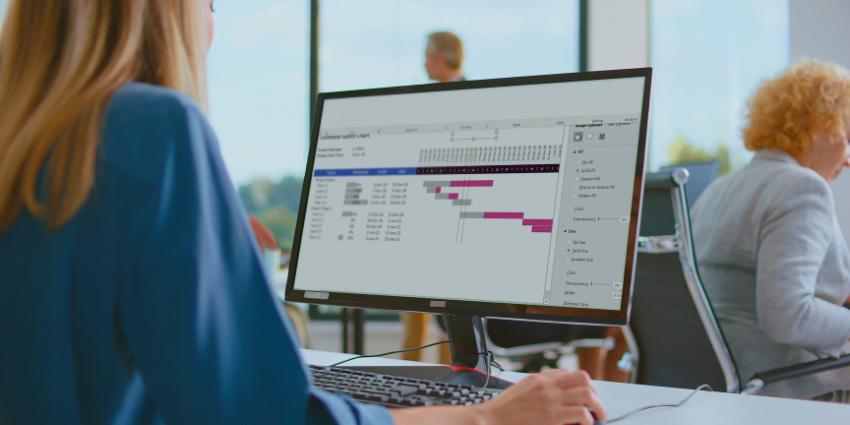
A modern project management platform typically includes planning features such as timelines, roadmaps, and dependency tracking. It also provides visibility across teams through dashboards and reporting tools that help leaders monitor progress, allocate resources, and identify risks before they become operational problems.
Many well-known platforms, including Asana, Monday.com, and Basecamp, fall into this category. These tools are commonly used by small businesses, mid-market organisations, and enterprises that require structured workflows and cross-team coordination.
However, the distinction between task and project management tools is becoming less rigid. Many platforms now combine both capabilities, allowing users to manage individual tasks while also tracking broader project milestones and resource planning.
As a result, organisations evaluating the best project and task management tools often focus less on strict categories and more on whether a platform supports the complexity of their workflows.
What Features do Modern Project and Task Management Tools Offer?
Modern project management platforms do far more than simply track tasks. Over time, they have evolved into systems designed to support the full lifecycle of work – from planning and execution to reporting and optimisation.
Assigning Ownership and maintain visibility across tasks = Clear accountability ensures teams know who is responsible for each piece of work and when it must be completed. Without this basic structure, even the most sophisticated project plan can quickly fall apart.
Resource Allocation = This allows teams to manage time commitments, track workload capacity, and analyse how resources are distributed across projects. This visibility is particularly valuable for operations leaders responsible for balancing competing priorities across departments.
Collaboration = Project management tools increasingly serve as shared workspaces where teams can store documents, exchange updates, and coordinate feedback without switching between multiple applications.
Planning Tools = Features such as project roadmaps, milestone tracking, and dependency mapping allow teams to visualise how individual tasks contribute to broader objectives. These tools help leaders anticipate bottlenecks and keep projects on schedule.
Reporting and analytics = These features provide visibility into project performance. Dashboards can reveal whether teams are meeting deadlines, how resources are being used, and where projects may be at risk.
Automation = This has quickly become a defining capability. Many platforms allow organisations to automate repetitive processes such as approval workflows, task creation, request forms, and deadline notifications. By reducing administrative overhead, automation enables teams to focus on higher-value work. McKinsey finds 21% of respondents whose organizations use gen AI say they have fundamentally redesigned at least some workflows, suggesting the real value comes when platforms reshape operations, not just speed up isolated tasks.
Taken together, these capabilities turn project platforms into operational hubs that support enterprise workflow orchestration, connecting collaboration tools, business systems, and team processes into a unified environment.
What are Hybrid Task and Project Management Platforms?
As the category evolves, many tools no longer fit neatly into either task management or project management. Instead, they operate as hybrid task and project management platforms that combine elements of both.
Hybrid platforms allow users to start with simple task tracking and gradually expand into more structured project environments. A team might start by organising daily work through task lists, then layer on timelines, automation, and reporting features as projects become more complex.
Platforms such as Notion and Airtable illustrate this shift. These tools offer flexible frameworks that can function as personal productivity systems, team collaboration spaces, or full-scale project management environments, depending on how they are configured.
This flexibility is attractive to organisations that want tools capable of scaling from individual work management to enterprise-level coordination.
Collaborative Work Management Explained
The rise of hybrid platforms has contributed to the emergence of the term Collaborative Work Management (CWM). Vendors often use this label to describe tools that combine project management, collaboration, and workflow automation capabilities. However, many analysts view CWM less as a distinct category and more as a marketing term applied to modern project management platforms.
In practice, many tools described as CWM systems are simply advanced project management platforms with stronger collaboration features.
Regardless of the terminology, the underlying trend is clear: organisations increasingly prefer tools that enable them to manage both tasks and projects within a single, flexible platform.
Why Do Most Project Management Tools Fail to Improve Productivity?
Most tools fail for a simple reason: they are added to broken workflows rather than fixing them.
In many organisations, work is fragmented across emails, chat platforms, documents, and multiple software systems. Teams rely on meetings to stay aligned, while project tools become passive trackers rather than active coordination systems.
This creates a common outcome. Teams have more visibility, but less clarity. More tools, but more friction.
The issue is not the technology itself. It is the lack of a unified system that connects work across teams and processes.
How are AI and Automation Transforming Project Management Platforms?
Artificial intelligence has become one of the most significant forces reshaping the project management landscape. 88% of organizations now use AI regularly in at least one business function, showing that workflow automation is no longer experimental for most enterprises
While traditional platforms focused primarily on tracking progress, AI-powered project management tools are increasingly capable of analysing workflows, generating insights, and even performing tasks on behalf of users.
One common application is AI-assisted task prioritisation. By analysing deadlines, workload patterns, and project dependencies, AI systems can recommend which tasks should be addressed first.
Automation also plays an increasingly important role in workflow creation. Instead of manually configuring complex processes, teams can rely on intelligent systems to automatically generate project structures, assign tasks, and establish timelines.
Another emerging capability is predictive analytics. The opportunity is significant: McKinsey says AI-powered next-best-experience capabilities can improve customer satisfaction by 15–20% while reducing cost to serve by 20–30%. AI models can analyse historical project data to forecast risks, identify potential delays, and recommend adjustments to keep projects on track.
More recently, the industry has begun exploring agentic AI, a concept that refers to AI systems capable of executing tasks independently. Rather than simply providing recommendations, these systems can update project timelines, trigger workflows, or coordinate approvals without direct human input.
Equally important is the rise of in-context AI, where intelligence is embedded directly within workflows. Instead of analysing project data separately, AI operates inside the tools teams already use, summarising updates, generating reports, and assisting with decision-making in real time.
For organisations seeking to streamline operations, AI can transform project management platforms into systems that actively support productivity rather than simply documenting it.
How do Project Management Tools Integrate with Collaboration Platforms?
Project management tools rarely operate in isolation. In most organisations, they function as part of a broader technology ecosystem that includes communication platforms, development tools, and enterprise systems.
Integrations with collaboration platforms such as Microsoft Teams and Slack allow teams to receive project updates directly within their communication channels. Notifications, task assignments, and workflow alerts can appear alongside everyday conversations, reducing the need to switch between applications. That matters because fragmented tool stacks create friction: Zoom cites research showing 54% of employees using more than 10 apps report communication issues, compared with 34% of those using fewer than five apps.
Project management platforms also integrate with development tools like Jira or DevOps environments, enabling software teams to connect development tasks with broader project timelines. This integration ensures that engineering workflows remain aligned with business priorities.
Connections with CRM systems, IT service management platforms, and business intelligence tools further expand the role of project management platforms. By linking operational data across systems, organisations can gain a clearer view of how work impacts customer outcomes and business performance.
Automation platforms such as Zapier or Microsoft Power Automate also play an important role. These tools allow organisations to connect workflows across applications, ensuring that updates in one system automatically trigger actions in another.
However, integrations can also introduce complexity at scale. Large enterprises must carefully manage data permissions, governance policies, and automation rules to ensure that integrations do not create security risks or operational instability.
When implemented effectively, integrations enable project management platforms to serve as coordination hubs, connecting collaboration technology to measurable business outcomes.
How do Project Management Platforms Support Asynchronous Collaboration?
As organisations increasingly operate across distributed teams and multiple time zones, asynchronous collaboration has become a critical capability.
Asynchronous collaboration allows teams to coordinate work without requiring everyone to be present at the same time. Instead of relying solely on meetings, teams communicate progress and provide feedback through shared digital environments.
Project management platforms are particularly well-suited to supporting this style of work. Task updates, status changes, and comments allow team members to communicate progress in a structured way that remains visible to everyone involved in a project.
Many platforms also integrate with tools that enable video messaging, screen recording, and digital whiteboards. These capabilities allow team members to explain ideas, demonstrate issues, or provide feedback without scheduling a meeting.
For example, a product manager might record a short screen walkthrough explaining a new feature request, while designers or developers review the recording later and respond with updates inside the project platform.
By supporting tools for asynchronous collaboration, project management systems help organisations reduce meeting overload while maintaining visibility across distributed teams.
Why Governance, Security, and Compliance Matter in Project Management Platforms
As project management platforms become more deeply integrated into organisational workflows, governance and security considerations become increasingly important.
These tools often contain sensitive operational data, including product plans, financial forecasts, customer information, and internal communications. Without proper controls, they can become sources of risk rather than productivity.
Enterprise IT teams therefore prioritise features such as access permissions, audit trails, and data retention policies when evaluating project management platforms.
The rise of AI has introduced additional governance challenges. Organisations must ensure that AI systems handling project data comply with internal policies and external regulations. Questions around model training, data usage, and transparency are becoming central to procurement decisions.
For IT and digital managers, the goal is to ensure that productivity platforms integrate securely with existing systems while meeting compliance and scalability requirements. Effective governance ensures that project management platforms remain reliable operational tools rather than uncontrolled data repositories.
Who Are the Leading Project & Task Management Vendors?
The project management software market is crowded, but a handful of vendors consistently sit at the centre of enterprise and team workflows. Platforms such as Asana, Monday.com, ClickUp, and Atlassian’s Jira are widely used across industries to coordinate tasks, plan projects, and integrate workflows with broader collaboration tools and business systems.
Alongside these, tools like Notion and Airtable have gained traction as flexible, hybrid environments – combining documentation, databases, and project coordination within a single workspace. Meanwhile, more lightweight platforms such as Trello remain popular for visual task tracking and straightforward team collaboration.
Together, these vendors form the core ecosystem of modern work management platforms, each offering distinct strengths in automation, integrations, customisation, and scalability for organisations evaluating project and task management solutions.
How to Choose the Best Project and Task Management Tools
Selecting the right project management platform requires balancing multiple priorities.
Operations leaders typically focus on workflow standardisation and cross-team efficiency. They want systems that improve coordination without adding unnecessary complexity.
IT and digital managers, meanwhile, evaluate platforms based on security, governance, and integration capabilities. A tool may offer impressive productivity features, but if it cannot integrate securely with existing systems, it may create more problems than it solves.
Team leaders and project managers often prioritise usability. Platforms must help teams stay organised and aligned without creating administrative overhead that distracts from actual work.
For this reason, organisations rarely select platforms solely on the basis of feature lists. Instead, they evaluate how tools support their operational processes, how easily they integrate with existing technologies, and whether they can scale as workflows evolve.
The best project and task management tools are ultimately those that align with an organisation’s structure, culture, and long-term operational strategy.
How to Implement Project & Task Management Tools
Successfully adopting a project management platform requires more than simply choosing the right software. Many organisations discover that the biggest challenges are not technical but operational – aligning teams around new workflows, establishing governance rules, and ensuring that the platform becomes a natural part of daily work rather than another unused tool.
For operations leaders and project managers, a structured rollout can significantly improve adoption and long-term ROI. A simple framework for adopting project management tools includes:
1 – Define workflow objectives early
Identify the processes the platform should support, such as task ownership, project visibility, resource allocation, or cross-team coordination.
2 – Start with a pilot team or project
Testing the platform with a single department or project allows organisations to refine workflows before scaling adoption.
3 – Integrate with existing collaboration tools
Connecting the platform with systems like Microsoft Teams, Slack, or CRM environments ensures updates and workflows appear where teams already work.
4 – Establish governance and permissions
Define data access rules, project ownership responsibilities, and compliance policies to prevent uncontrolled information sprawl.
5 – Standardise templates and workflows
Creating repeatable project templates helps teams adopt consistent processes and reduces administrative overhead.
6 – Provide training
Empower team leaders or project managers to guide colleagues through the new workflows and encourage consistent usage.
7 – Measure adoption and workflow performance
Use reporting dashboards and analytics to monitor engagement, identify friction points, and optimise processes over time.
When implemented thoughtfully, project management platforms can become far more than task trackers. They evolve into operational frameworks that help organisations coordinate teams, automate workflows, and maintain visibility across complex projects.
What Is the Future of Project and Task Management?
The future of project and task management lies in orchestration rather than organisation.
As workflows become more complex and AI becomes more capable, platforms will increasingly take on an active role in coordinating work. They will connect systems, automate decisions, and reduce the need for manual intervention.
The organisations that succeed will not be those with the most tools, but those with the most effective systems for managing how work flows across the business.
Working Smarter
Project and task management tools have come a long way from their origins as simple digital checklists.
Today’s platforms function as collaborative work environments that coordinate projects, automate workflows, and connect operational data across multiple systems. The rise of hybrid platforms, AI-powered capabilities, and integration ecosystems is pushing these tools toward a new role as engines of enterprise workflow orchestration.
For organisations navigating increasingly complex workflows, the ability to plan, coordinate, and automate work across teams has become a strategic advantage.
Understanding the differences between task management tools, project management platforms, and hybrid systems is the first step toward choosing the right solution – and unlocking the full potential of modern collaboration technology.
FAQs
What is the difference between task management and project management tools?
Task management tools focus on organising individual tasks, while project management tools coordinate workflows, resources, and timelines across entire projects.
What features do modern project management platforms offer?
Modern platforms provide task tracking, resource allocation, collaboration, planning tools, analytics, and automation to manage the full lifecycle of work.
What are hybrid task and project management platforms?
Hybrid platforms combine simple task tracking with advanced project management capabilities, allowing teams to scale workflows as complexity grows.
How is AI transforming project management tools?
AI is enabling platforms to prioritise tasks, automate workflows, generate insights, and even execute actions independently within projects.
Why are integrations important in project management tools?
Integrations connect project platforms with collaboration, development, and business systems to streamline workflows and reduce tool fragmentation.
How do project management platforms support asynchronous collaboration?
They allow teams to share updates, feedback, and progress in shared workspaces without requiring real-time communication.
Why do governance and security matter in project management platforms?
Strong governance ensures sensitive data is protected, access is controlled, and platforms remain compliant as they integrate into core business workflows.
How should organisations choose the best project management tool?
Organisations should select tools based on how well they align with workflows, integrate with existing systems, and scale with operational needs.