
The best inventions are those which do precisely what they were designed to do.
Stating the obvious?
Well, not entirely.
Often, functionality is a retro fit.
Established products or solutions are sometimes adapted to suit new or evolved purposes; flexed to accommodate additional demand on their original capabilities.
Digital collaboration platforms were first to do so when the pandemic struck: providing ways in which remote and disparate workforces could continue to thrive.
Some did a sterling job; quickly adding video to their existing messaging and document sharing functionality with which they had had initial (pre-pandemic) success.
But adding more later doesn’t always equal a better whole.
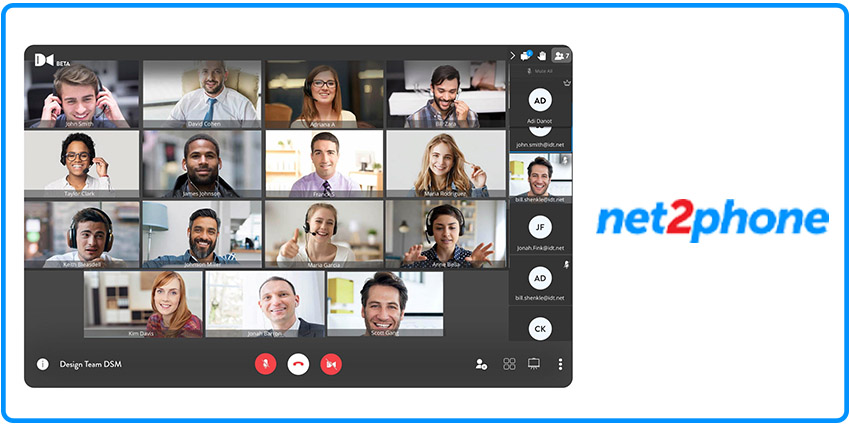
Better, maybe, to have native functionality designed-in from the very outset – just like ‘Huddle’, the smart collaboration platform from fast-growing cloud telephony innovator net2phone.
It was a video-first platform from the get-go.
All of its functionality is specifically designed to provide a simple, rich and reliable face-to-face communications experience: no superfluous features; no complicated over-engineering.
As a result, users love it.
“When you design a product, it’s always best to focus fully on the user’s needs now,” says Scott Bleasdell, net2phone’s Vice President of Product.
“Back in the day, collaboration platforms were all about document sharing; video conferencing was secondary and pretty niche.
“Then the pandemic struck and the way the world worked was forced to change.
“We all got video conferencing in the palm of our hands via our smartphones.
“Microsoft Teams was quite late to respond but they eventually figured it out and it IS now a good solution, but only if your organisation runs Microsoft.
“If you are not a Microsoft player, then you don’t have Microsoft Teams and so you have to look elsewhere.
“We built Huddle to enable people to connect to each other in a truly meaningful way and with an emphasis on simplicity.
“We knew people would want to communicate via video from all kinds of different locations and that many would no longer work from an office.
“We knew they would value privacy so we designed-in imported functionality to change or blur their backgrounds.
“We knew background noise would be an issue for many so we designed-in background noise suppression functionality.
“We knew people would want to react during a video collaboration so we designed-in engaging, notification and chat functionality.
“And finally, we knew ease of use would be key so we designed-in single sign-on and pre-populated password functionality.
“People love it because it does exactly what they want it to do – that’s the beauty of designing a product for the now, as opposed to having to retro fit in order to catch up”
Importantly, Huddle is also easily accessible to anyone – inside OR outside of a user organisation – regardless of whether either organisation runs Microsoft Teams.
When you consider that Huddle has call recording functionality; the scale to accommodate up to 100 people in a meeting; built-in YouTube integration for live streaming events and webinars; AND is provided at no extra cost as part of net2phone’s wider offering, it’s easy to see why it is so popular.
When you also consider that video conferencing per se is likely to become more and more prevalent – both in the corporate AND consumer spaces – it’s clear that Huddle’s performance and simplicity are likely to count for an awful lot more going forward too.