
Nectar is a leading UC Performance Management, Monitoring and Diagnostics company based in the US. While they certainly do a lot in the fields of Collaborations and Contact Centers, one of their solutions, Nectar 10, is especially worth mentioning these days.
Nectar 10 is an all-in-one, multi-vendor UC&C Service Management solution, designed to monitor and troubleshoot platforms like Teams, Skype for Business, Cisco, Avaya and others. One of the best things about it is, it keeps things simple.
“We really have a focus on ease of use,” says Ken Lasko, MS Teams Product Manager at Nectar. “We’re trying to make it easy for administrators and users to get to the bottom of what is causing poor call quality in their platforms, and also to gauge and find usage patterns. Things like: How many people are using the platform? How many minutes of PSTN calls did we have via conferencing in the past week, month, year? We try to answer these questions with a ready-made solution that out of the box is going to help our clients monitor, manage and maintain their call quality.”
Keeping things simple naturally means that you don’t need to be an expert in order to be able to benefit from this solution.
“Back in the day, everybody had their built in experts who lived and breathed telephony. But with the move to the cloud, you ended up having a lot of people who come from more of a a general computing background, and are all of a sudden having to manage voice environments. Since I wasn’t a telephony guy until I started working with Microsoft Office Communications Server back in 2007, I feel like I can understand our customers well. When I look at some of our stuff from the old days I go, ‘That’s way too complicated for guys like me’. So one of the main goals is to simplify things while still providing that high level of detail that your telephony guy would want to see.”
Teaming Up
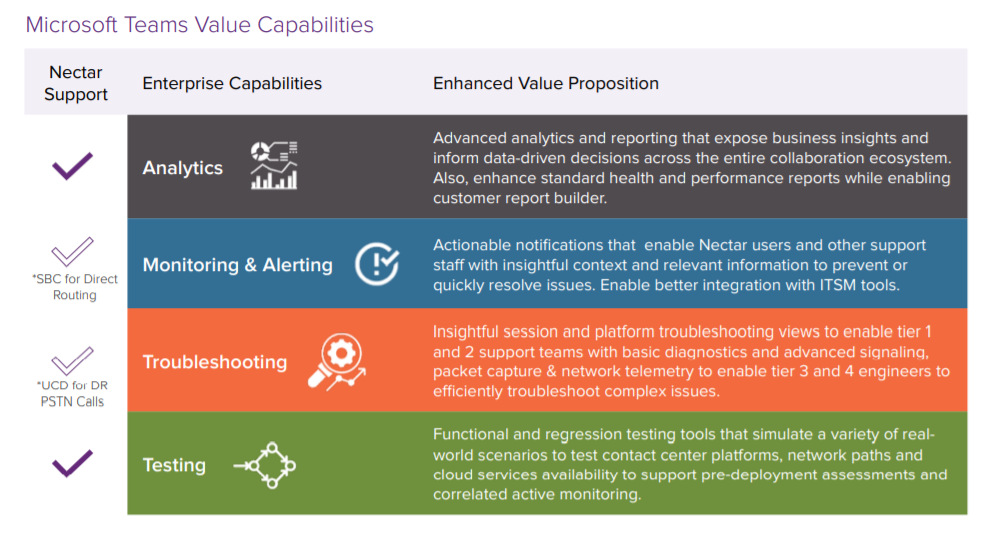
One highly-anticipated integration of Nectar 10 that went live right in the middle of COVID is the one with Microsoft Teams. This means that since April, it offers advanced troubleshooting and analytics for each and every call made using Teams.
So, what makes Nectar 10 so special compared to Microsoft’s native tools? Or in other words: why does your company need it?
“Microsoft does a decent job of showing you high level trends,” says Lasko. “But what it lacks is the ability to really drill down and see who’s being affected by these trends?”
To demonstrate, let’s assume my imaginary company is using Microsoft’s native tools to monitor its calls. These tools show that my Singapore location has been experiencing poor call quality for the past two weeks. Now, naturally, I would like to know who is affected by that on the individual user level. The thing is, Microsoft’s tools lack that ability.
“What we hear from administrators all the time is that Microsoft lacks that link to be able to get to the low level from the high level. So we just tried to provide an organic way to be able to look at the high level trends and then be able to see exactly who’s affected by it. You can pick individual calls and see exactly what happened. And then you can drill into that person even further and see more. Or, alternatively, we can see everybody’s having a bad experience at one particular location and look into that.”
One other important element that Microsoft lacks is the ability to provide real-time data.
“You can’t get real-time information from Microsoft at all,” says Lasko.
“But Nectar 10 can do that in conjunction with what Microsoft calls ‘Direct Routing.’ Direct Routing is where the customer brings their own telephony connection to the PSTN network. And we are able to monitor that side of things in real-time”
No More Blind Spots
In fact, the ability to monitor Direct Routing PSTN calls is precisely where Nectar’s USP lies.
“That’s the thing that makes us stand out from everybody else, since Microsoft and a lot of other solutions can’t really see what’s going on at the SBC level. It’s very easy to see what’s going on from the user to Teams, but then when that media stream goes from Teams to the SBC and from the SBC to the PSTN, you’re mostly blind.”
In fact, you could be experiencing call quality problems and either not know about it or simply not know what’s causing it. This means that if a user calls my aforementioned imaginary company and complains about a terrible PSTN call, and I use the Microsoft tools to try and see what went wrong, they would only show the first leg – from the user to Teams. And if everything was fine there, I can soon find myself facing a dead end.
“If the problem was from Teams to your on-prem telephony equipment, or from that equipment to the PSTN, you wouldn’t be able to see it,” according to Lasko. “So what would typically happen is that you would end up discounting it and say, okay, this user is crazy. And even though the user had a valid bad experience, you wouldn’t be able to actually see what’s wrong and fix it.”
COVID-Compatible
“Our platform was initially released for Skype for Business and for Cisco,” says Lasko. “And once Microsoft released their integration for Teams in April, we were right there ready for them. But we didn’t plan COVID, of course [laughs]”.
Planned or not, this was a “serendipitous” turn of events, as Lasko puts it.
“I consider ourselves very lucky, since so many people have been negatively affected by COVID, while we’ve been busier than ever. We’ve had a ton of customers (we’re talking large multinational corporations) who instead of doing their Skype-to-Teams migration over years, did it over weeks! And happily, they were able to use our tools to monitor their environment as they did their migration.”
The unprecedented attendance rate on Nectar Corp’s webinar on this exact subject in August says it all.
“Usually you get around 30% attendees to your actual registration. And in that one, we topped over 300 registrants and had 50%. And that doesn’t even include the follow-on on-demand views”