
Meta Ray-Ban vs XReal Air 2: which smart glasses offer the best experience to consumers and enterprise users right now? As demand for smart glasses continues to grow, Meta and XReal have both proven themselves to be strong contenders in the industry.
However, both vendors have approached the market in different ways. Before introducing the cutting-edge Meta Orion prototype specs at Meta Connect 2024, Meta’s “smart specs” focused more on AI technology and content creation than extended reality.
Alternatively, XReal’s Air 2 glasses are more “immersive.” They give users a rich “wearable display” they can use with a host of connected devices, like laptops and smartphones. However, they don’t have built-in cameras for capturing and streaming content.
So, which glasses are best? We put them head-to-head to find out.
Meta Ray-Ban vs XReal Air 2: Overview and Specs
Both Meta’s Ray-Ban glasses and the XReal Air 2 specs are trendy, intelligent glasses designed to offer users a lightweight “immersive” experience in different ways. Meta’s Ray-Ban specs don’t offer augmented reality, but they do allow users to capture content with an integrated camera, make calls, listen to music, and interact with an AI assistant on the move.
XReal’s glasses are sleek, stylish “AR” specs, which can surface content from a connected device in front of your eyes. They don’t feature spatial computing solutions or hand and eye-tracking capabilities, like some cutting-edge AR glasses. However, they do allow you to view content overlaid on top of your vision, like a heads-up display.
Here’s a quick look at the technical specifications side by side.
| Meta Ray-Bans | XReal Air 2 | |
| Price | Starting at $299 | $399 |
| Weight | Starting at 48.6g | 72g |
| Audio | Custom-built speakers, and five microphones for audio recording. | 2nd generation sound system with 2 microphones. |
| Camera | 12MP ultra-wide portrait camera | None |
| Storage | 32GB | None |
| Display | None | 0.55 Micro-OLED panels |
| Resolution and FOV | 1080px video capture | 1920 x 1080 per eye, up to 500 nits of brightness, and 120hz refresh rate. 46 degree FOV |
| Connectivity | Bluetooth, and Wi-Fi | USB-C |
| Battery life | Up to 36 hours | None |
Meta Ray Ban vs XReal Air 2: Design and Comfort
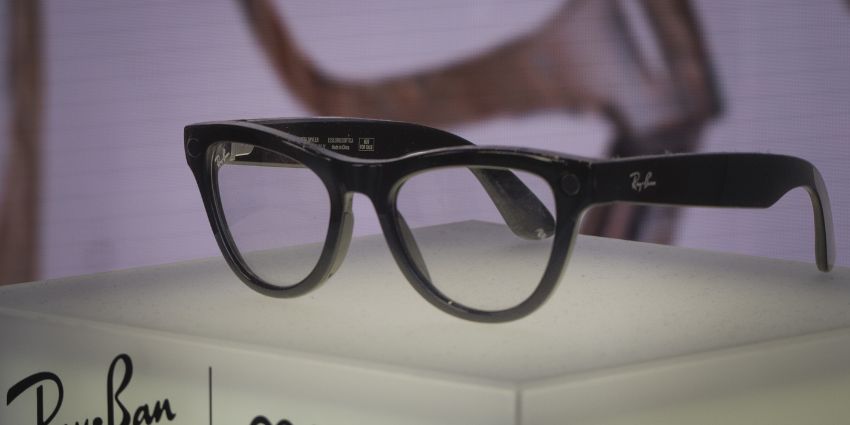
At a glance, the Meta Ray Ban and XReal Air 2 glasses look pretty similar. They’re both designed to look and feel like a standard pair of eyeglasses. They also both give users customization options. For instance, with Meta you can experiment with different frames and styles. With XReal, you can purchase a “Kaleido Kit” to add a splash of color to your specs.
Meta definitely gives you a lot more freedom in terms of customization however, with hundreds of different styles and lenses to choose from. Plus, XReal’s specs are definitely chunkier, thanks to the built-in Micro-OLED panels. They also weigh a little more than Meta’s glasses, so you might find they become a little more uncomfortable to wear after a while.
Still, you do get swappable nose clips and soft arms on the XReal specs, which help to minimize pressure around your ears and nose. Both pairs of specs support prescription lenses, although with the XReal glasses, you need to “clip” a pair of lenses into the frames. With Meta’s Ray-Bans, you can choose to have a prescription built into your specs when you’re purchasing them.
In our opinion, it’s not the fact that Meta’s glasses are more stylish and lighter than the XReal specs that really makes them stand out from a design perspective, however. What we really love about Meta’s glasses is that they’re truly wireless. You can connect the glasses to a phone or another device through Bluetooth or Wi-Fi. Alternatively, with the XReal glasses, you have to connect your device via a wire, which is a little annoying after a while.
Displays and Visuals: Meta vs XReal
As mentioned above, Meta’s glasses aren’t designed for AR experiences. They don’t include displays so you can view digital content overlaid on top of your “real world” environment. However, you do get a built-in 12MP camera, which is a huge upgrade from the camera on the previous Meta specs.
Users can use this camera to capture 1080p video with exceptional clarity. Plus, you can immediately stream or share the content you’re seeing through social media. XReal’s glasses don’t allow you to capture and share content, but they do offer a robust “augmented reality” experience.
The Air 2 glasses come with a pair of Sony Micro-LED displays, which deliver fantastic 1920 x 1080 per eye resolution visuals. Plus, you get an impressive 120hz refresh rate, and up to 500 nits of brightness. Notably, the field of view on the XReal Air 2 glasses is a little limited compared to some alternatives. However, you can still enjoy bright, crisp, and colorful images. You can even access virtual screens up to 330 inches in size, which is great for immersive collaboration.
Users can also select from various different “display modes”, taking advantage of body anchoring, smooth follow modes, and more, depending on their needs. Clearly, XReal wins the medal in this comparison for a better “visual” experience. However, it’s worth noting that there are stronger AR glasses out there if you’re looking for true immersion.
Meta Ray-Ban vs XReal Air 2: The Audio Experience
It isn’t easy to find a pair of smart glasses that excel from an audio perspective. Both the XReal Air 2 and Meta Ray-Ban specs do include built-in speakers and microphones, but they’re pretty limited. The audio for the XReal Air 2 glasses is better than what you’d get on the standard Air specs from the same brand, but there’s not a lot of depth or bass.
The volume isn’t excellent on these glasses either, but that might be good if you’re worried about sound leakage. The Meta Ray-Bans have decent speakers too, but they also struggle with depth. We do think that the microphones built into the Ray-Bans are a lot better for immersive collaboration however. The five microphone array is fantastic at picking up voices with exceptional clarity.
We had no problem using these glasses to make calls, and they’re great for capturing and streaming immersive video. Plus, the integrated microphones are fantastic for users who want to communicate with Meta’s built-in AI assistant when they wear their specs.
XReal’s microphones are still decent enough for phone calls and augmented meetings, but we’d probably recommend using a pair of Bluetooth earbuds with an integrated microphone for the best experience. Earbuds would also help to eliminate the “audio leakage” issue, if you’re worried about people listening into private conversations.
Performance and Functionality
Both Meta’s glasses and XReal’s Air 2 specs aren’t designed to be “standalone” headsets. They both need to be connected to another device if you want to take advantage of most of the available features. However, as mentioned above, Meta’s glasses can connect wirelessly to a phone, whereas you need to rely on a wire with the XReal Air 2 specs.
When you connect your XReal glasses to a phone, laptop, tablet (or the XReal Beam accessory), you can interact with various types of digital content displayed in front of your eyes on a customizable virtual screen.
This makes the XReal Air 2 specs excellent for watching videos and completing various tasks. You can browse the web, join a meeting in augmented reality, and more. The biggest downside is that without the XReal Beam, your glasses will likely run out of battery quickly, particularly if connected to a mobile device like a smartphone or tablet.
There’s also no built-in AI assistant, and you don’t get any hand or finger-tracking capabilities. The only way to interact with content through the XReal Air glasses is to use your smartphone.
With Meta’s glasses, the wireless connection to your phone lets you leverage an app to control various parts of your immersive experience. You can capture content and share it on social media, listen to music, make calls, and interact with Meta AI.
The AI assistant is actually a fantastic feature, allowing users to automatically record video hands-free or ask questions while they’re on the move. Meta’s glasses also have a built-in battery, which gives you up to 36 hours of power on a single charge, so there’s no need for any annoying wires.
Meta Ray-Ban vs XReal Air 2: The Verdict
So, Meta Ray-Ban vs XReal Air 2: which glasses are best? The answer really depends on what you’re looking for in a pair of smart specs. If you want smart glasses that give you instant access to an AI assistant, and allow you to capture and stream content on the move, the Ray-Ban specs are a great choice. They’re stylish, lightweight, powerful, and incredibly intuitive.
Plus, they’re great for making calls and connecting with team members thanks to the multiple microphones built into the frames. However, if you’re looking for an affordable set of augmented reality glasses, the XReal Air 2 glasses are obviously the better pick.
They do lack some of the advanced features of more high-end augmented reality specs, such as hand and eye tracking capabilities, but they’re comfortable, convenient, and reasonably stylish. The visuals are also excellent, particularly when you consider how inexpensive these glasses really are.
Overall, we’d probably recommend the Meta Ray-Ban specs mostly to content creators and consumers looking for a novel way to bring advanced technology into their everyday lives. Alternatively, the XReal specs are a great option if you want to upgrade your productivity at work with a virtual screen, or turbo-charge at-home entertainment.