As part of an ongoing commitment to deliver the most seamless experiences to customers and users, Webex Teams is introducing a new in-space update this month. According to Cisco, the large design change aims to fix some of the flaws with the old Webex in-space menu design.
This transformation will sweep away problems with finding content, meeting options, and calling solutions, and provide you with a more straightforward experience when it comes to collaborating in and outside of the office. The update took several months of feedback analysis and design to create. It’s now ready to roll out to users.
What Can You Expect
The Webex team has been careful to boost functionality, without destroying the familiar experience that users have gotten used to. The overall atmosphere of the Teams solution feels the same, but things like the “ellipsis” menu are easier to access.
- Messages: Messages are still in the same location, but you can also find them easily by clicking on a dedicated “Messages” tab
- People: The new People list will also appear in a tab, offering a quick insight into the number of people in a space. You can also review the contact cards of individuals in a space when you need context for a meeting
- Adding People: You can add people easily to a space, and there will be no “People” tab in a one-on-one chat. You also won’t be able to add new users to a one-to-one space. However, you can review a contact card at any time by hovering over the person’s avatar
The Content tab is also getting an overhaul. Here, you’ll find files, Whiteboards ECM, and Links. Additionally, Webex will now be displaying your content in a grid format, so you can more easily review all the files in a space. Hovering over a file will offer the same options as before, including the option to jump to a message where the file was sent.
Whiteboards will also have a similar layout to files, so you have more space to review the content shared. You can remove a whiteboard from a space by hovering over it and clicking “delete”. What’s more, URLs shared in your space will also have a dedicated links section, so you can find locations that you need to visit as rapidly as possible.
Your Enterprise Content Management solutions will also be found in the same area as they were before, with your files. You can set up linked folders to a space in the top right hand side of the files section.
Other Changes to the In-Space Design
All of the updates to the Webex Teams experienced are focused on making your life easier as you interact with your coworkers and employees.
The Schedule solution in Webex Teams will be in the same place, in the third column of your user interface, under a dedicated tab. The in-space schedule will show all the meetings organised within a specific space. Because the information is only one click away, you can rest assured that your teams are always aware of the latest upcoming meetings. The UI buttons have also been enhanced to make them easier to read.
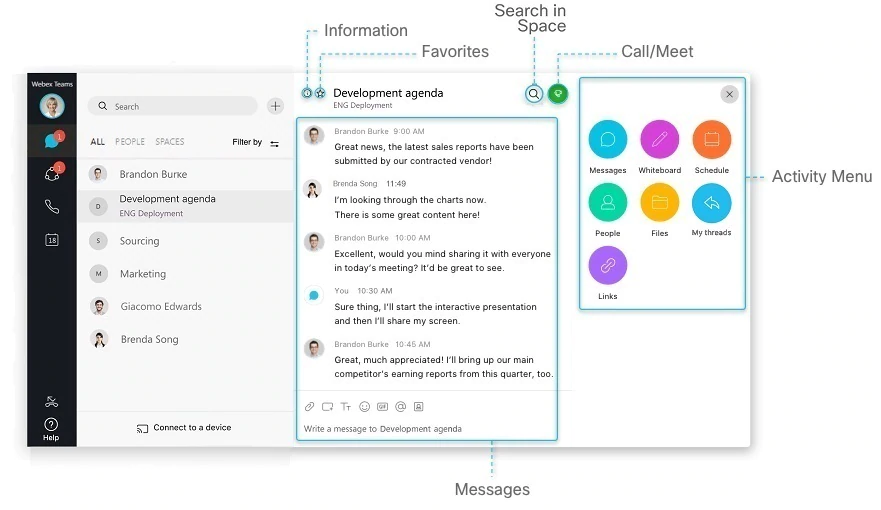
There’s also a slight update to the “My Threads” section on Cisco Webex Teams. The research that the company did found that this area was being used as a navigation solution to jump to original message threads. To assist with this, Webex has moved the My Threads option to a button at the right-hand side of the space header. Clicking this button prompts a call-out, which users can access to find the right message thread without being removed from a current location.
Space information and settings will also be in the exact same space as before, but the icon has been updated to a standard settings cog.
The Webex team believes that the newly updated in-space design will help make users in the Webex environment be more productive as they interact with their team members. The exciting changes to the interface aren’t so drastic that they’ll leave you needing to learn how to use your software all over again, but they should make a significant change to the convenience of the Teams experience.
Cisco have recently updated their announcement
“We’re accelerating the availability of this month’s update, and we’re not requiring current users to switch to it right away. Instead, we’re pausing our automatic updates to our desktop this month, and letting you download them directly.
If you’re new to remote work, we’re here to make the change easy—keeping you connected to your team. As more people are having to adjust to remote work and use collaboration tools, we’re releasing a new design this month that we think makes it easier to use Webex Teams.
If you download today’s release, you’ll get the new design, whether you’re new or experienced with the app. Our team shared some insight about these changes on our blog.”