
Online meetings naturally feel more inclusive. No one has to travel to turn up and share a seat at the table. Anyone with an internet connection can show up and get involved. That fixes the geographical barrier with global collaboration. It doesn’t fix the language barrier.
That’s why one of the most useful AI-powered features in today’s collaboration tools is also one of the simplest: live translation. Every vendor seems to offer some version of it, whether it’s live captions showing up on a user’s screen or support from something like Microsoft’s Interpreter Agent.
Those features might not seem particularly exciting at first, but they’re powerful. They help align teams and make collaboration tools more accessible. However, they can also shape power dynamics, depending on how you use them.
Further Reading:
- Ensuring Digital Inclusion in Hybrid Work
- Beyond the Language Barrier: How Real-Time Translation Transforms UC
- Is Poor Communication Costing More than You Think?
How Does Live Translation Work in UC?
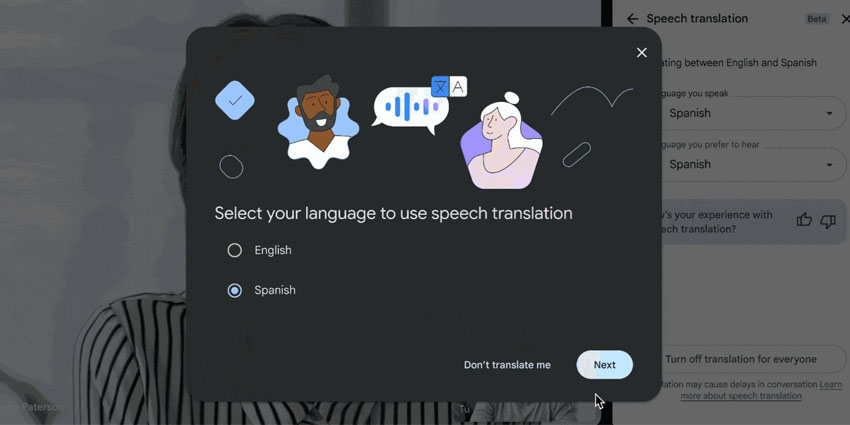
Live translation usually depends on artificial intelligence. Machines process speech in real-time and convert it into other languages or captions. Most UC platforms have a version of this feature baked in already, from Microsoft with its Interpreter agent, to Zoom and Slack.
Usually, the translation requires a few steps:
- Audio is captured and processed by the system in real-time, while the person is still talking.
- An AI model interprets or analyzes the speech, often considering the meaning behind entire phrases, rather than just translating word by word.
- The system delivers the translation either in text or audio format.
It’s pretty straightforward, but translation tools have become a lot more effective in recent years. The evolution of more advanced AI models has allowed for better language coverage, stronger audio capture, and higher accuracy in most of the top tools.
How Does Live Translation in UC Enable Inclusive Collaboration?
Recent enterprise research shows 79 percent of organizations are seeing growth in non-native English participation at meetings. Eighty-eight percent report two or more languages spoken in events. Forty percent are juggling six or more. Teams are increasingly global, which is why live translation in UC is such an important tool for participation.
When someone can follow a fast-paced discussion in their own language, they interrupt sooner. They correct assumptions earlier, and they don’t wait until after the call to send a “just to clarify…” email that quietly rewrites what happened. That lag used to be expensive, and it didn’t exactly help make workplaces feel “inclusive”.
Used correctly, live translation brings balance to a meeting. It improves:
Engagement
In multilingual meetings, speed decides who gets heard. The people who think and speak in the same language move first. Everyone else is a beat behind, converting phrases in their heads before they can even react. That tiny lag builds up. By the time they’re ready to jump in, the group has already pivoted.
That’s exactly why companies like Microsoft start introducing “interpreter” agents in the first place. The whole point was to help reduce language friction in meetings so participants could speak and listen in their preferred language.
Participation patterns shift. Non-native speakers contribute earlier. Interruptions become clarifications instead of confusion. The pacing improves because fewer people are stuck asking, “Wait, what did they say?”
There’s also a psychological layer people don’t talk about enough. Speaking in your second language in front of senior leadership is stressful. It narrows your vocabulary. It makes you hedge more than you normally would. Inclusive collaboration improves when people feel they can express nuance without worrying about grammar.
Global Reach
Language is one of the biggest blockers of global growth.
You see it in global town halls where regional questions never surface. In cross-border project standups, updates are brief and safe. Even in M&A integration meetings, the acquired team listens more than it speaks. Sometimes, in customer onboarding sessions where one language dominates, everyone else adapts.
Live translation widens the room.
Cisco Webex builds multilingual meeting controls directly into its platform. Hosts select spoken languages. Captions are translated across dozens more. That design detail places responsibility with the meeting owner, not the participant. It treats multilingual participation as an operational choice, not a workaround.
Alignment and Documentation
Live translation in UC doesn’t stop at helping people follow along. It feeds transcripts, summaries, auto-generated action items, and searchable knowledge.
If the intelligent records of crucial meetings are going to be complete and accurate, statements made in other languages need to be considered. Otherwise, you end up with a missing chunk of context. Plus, you leave global participants wondering whether there was any point in them showing up at all.
The important thing to remember here is that even if a system can capture different languages, the summary still needs to be double-checked and reviewed by a human. AI can make mistakes and accidentally prioritize some voices more than others.
Support for Hearing and Processing Differences
The language gap isn’t the only thing that real-time translation helps close. Translated captions and summaries can also support deaf and hard-of-hearing employees. That’s obvious. But they also support people who process information differently. Neurodivergent employees who need to see text while listening. People dialing in from loud environments. People in back-to-back calls who missed a phrase and need to catch up instantly.
They also reduce speed bias. The fastest speaker shouldn’t automatically control the direction of a conversation. When captions are visible, participants can scan what was said before responding. That small delay improves clarity.
Unsure where communication issues come from in today’s workplace? Check out our guide to the biggest communication gaps in remote teams, and how to fix them.
What Risks Exist with Real-Time Translation?
Most people can see how live translation benefits teams and digital inclusion, but there are still risks to consider. Once live translation in UC feeds transcripts, summaries, and action items, it starts behaving like a record. That makes governance crucial.
Accuracy vs Speed vs Trust
Real-time translation moves quickly, and that speed can smooth over details that actually matter.
Cisco’s own guidance points out that transcripts can be refined after the meeting. The first pass isn’t always the clean, official version. That’s important. People don’t treat it like a draft. They forward summaries right away and drop them into CRM records. They spin up tasks based on language that might still need review. Once that happens, the “draft” becomes reality.
I’ve seen objections turn into “alignment” in recap notes. I’ve seen tentative phrasing sound decisive after compression. That’s not malicious. It’s how summarization works. But it means trust shouldn’t be automatic.
Consent and Disclosure
If speech is being transformed, participants should know. Not through a three-page policy document. Through a simple norm. A brief line in the invite. A quick mention at the start of the meeting. Translation on, captions active.
When AI use is invisible, people get careful. They edit themselves. Or they go the other direction and pull out their own side tools because at least those feel predictable. That’s how things get messy fast. Different summaries floating around. Different transcripts are saved in different places. Everyone is convinced their version is the accurate one. Good luck untangling that later.
Sensitive Content and Data Flow
Translated text is easier to share than audio. It’s cleaner. Searchable. Portable.
That portability is a strength for inclusive collaboration, but it’s a risk too.
Theta Lake’s recent survey found 99 percent of organizations are adopting AI, yet 88 percent are struggling with compliance and security challenges. That gap shows up fast in UC environments where artifacts move across platforms.
A translated summary copied into a ticket. A recap forwarded externally. A snippet pasted into a proposal. Once that happens, the translation isn’t contextual anymore. It’s evidence.
If you’ve read our breakdown of AI data risks in UC, you already know the issue isn’t storage alone. It’s reuse, traceability, and knowing where the text traveled and whether it was reviewed before it did.
Translation Tools as Machine Colleagues
We’re quickly moving on from reliance on simple, translated captions. Now interpreters are showing up as additional colleagues in the meeting. They listen, convert conversations into text, and even make decisions on behalf of humans.
That means someone needs to own these tools.
- Who decides when they’re enabled?
- Who defines what happens to the output?
- Who reviews high-stakes summaries before they leave the room?
Features are easy to deploy. Rules are harder to design. But without rules, accessible UC can drift from inclusion to exposure.
Fair Access to Translation Tools
There’s also the question of who actually gets these tools.
Live translation sounds like something anyone working across languages should have access to. That’s not always what happens. Executive teams usually get it first. Revenue teams often follow. Everyone else gets told it’s “coming soon.” That staggered rollout changes meeting dynamics more than people realize.
If one group can speak in their native language and read clean translated captions while another group is still translating in their head, the gap shows. The first group responds faster. Their comments sound tighter. Their follow-ups look more polished. After a while, that speed gets mistaken for capability.
How Should Enterprises Govern AI Translation?
Live translation in UC tools can be extremely helpful. Teams just need to make sure they’re deploying these features carefully, safely, and ethically.
Define the Role of Translation AI
Not all live translation in UC behaves the same way.
- Some deployments are observational. Captions only. No summaries or action items.
- Some are interpretive. Translation feeds transcripts and recaps.
- Some are operational. Translation feeds task creation, CRM entries, or workflow triggers.
Those categories matter. If translated output is shaping downstream systems, it deserves review standards. Especially in regulated contexts and in customer-facing environments.
Standardize Disclosure
A simple norm works: “Live translated captions are enabled for accessibility.”
That’s it.
When disclosure is consistent, people don’t treat translation as surveillance. They treat it as infrastructure.
We’ve already seen what happens when AI usage feels hidden. It fuels shadow tools and harms psychological safety at work. Visibility reduces that pressure.
Review High-Impact Outputs
Not every meeting recap needs legal review.
But high-stakes discussions do.
Customer commitments. Regulatory discussions. HR matters. Board-level conversations.
Real-time transcripts can be refined after the meeting. Summaries compress nuance. That means someone needs to confirm the final version before it travels.
Limit Silent Expansion
Translation features expand quickly across platforms. Meetings. Webinars. Chat summaries. Phone integrations.
Quarterly reviews help answer basic questions:
- Where is translation enabled?
- Where do translated artifacts flow?
- Who can export or forward them?
As regulations tighten around AI documentation and accountability, evidence matters. Our analysis of the AI compliance trap under the EU AI Act makes one thing clear. Intent doesn’t protect you. Traceability does.
Measure Inclusion Signals, Not Just Adoption
License counts don’t prove inclusive collaboration.
You want to look at signals like:
- Are participation patterns more balanced in multilingual meetings?
- How often are summaries edited after distribution?
- Do translated action items complete at the same rate as human-created ones?
- How often do teams revisit decisions because “that’s not what I meant”?
Our breakdown of the only UC analytics that matter can help here. Measure outcomes. Not feature toggles.
Live Translation Is Infrastructure Now
Live translation in UC has become an essential part of the digital work experience. It affects who speaks, who gets understood, and what gets remembered.
But once translation feeds transcripts, summaries, and action items, it stops being assistive. It shapes institutional memory. That’s what drives performance reviews, customer relationships, compliance logs, and strategic decisions.
That’s why accessible UC has to be designed intentionally. If translated captions are the default in global meetings, participation rises. When translated summaries are reviewed before external sharing, risk drops. If governance is clear, trust holds; if not, confusion scales quietly.
If you want the bigger picture on how all of this fits into enterprise collaboration strategy, start with our guide on What is Unified Communications?. Because once you see UC as infrastructure, the responsibility around live translation becomes obvious.
FAQs
What is inclusive collaboration technology?
It’s any collaboration platform or tool designed to ensure that everyone in your business can participate equally in a conversation. It features tools that help users, regardless of location, ability, or background, to play a role in a conversation.
Who actually benefits from live translation in meetings?
Anyone not working in their first language. Global teams feel it the most. Instead of translating every sentence in their head, people can read along and focus on the discussion itself.
Is real-time translation reliable enough to trust completely?
Not always. It’s good for following the conversation, but wording can shift a little. That matters if the meeting leads to decisions or commitments, so teams usually double-check summaries before sharing them widely.
How should teams handle translated summaries or transcripts?
The safest habit is to treat them like rough notes. Useful for reference, but worth a quick check before they get copied into a ticket, CRM record, or customer update.
Can translation tools change the balance of a meeting?
They can. If some people have translated captions and others don’t, the first group usually reacts faster. That difference can quietly shape who speaks the most.