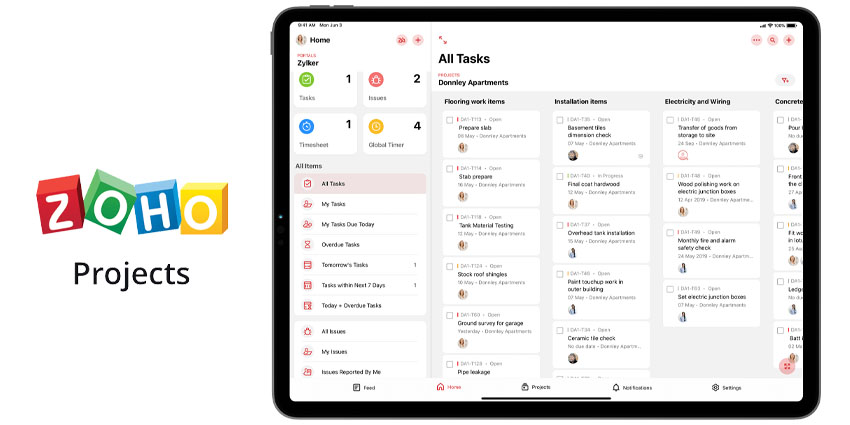

Cloud-based project management platform Zoho Projects has recently celebrated 15 years of enabling team collaboration and project planning for businesses around the world using its comprehensive interface.
The Zoho Projects mobile app is slightly younger, having been around for a decade now. It was released for iOS in 2012, and support for Android devices came the following year. In a Work from Anywhere era, the relevance of the app’s mobile version is reinforced and becomes more critical than ever before.
Project Management on the Go
For Zoho, the main objective in creating a mobile version of the project management app was allowing users to enjoy its diverse set of features even when they’re outside the office.
“We recognized our customers’ need to access our tool from everywhere, ” shares Allen Lee, Engineering Manager at Zoho Projects Mobile.
“The mobile version brings all the same advanced tools like task planner, issue tracking, time logging and reporting within users’ reach even when they’re away from their desks, so that they never miss a beat,” he says.
Having access to Zoho Projects from their mobile devices facilitates users to stay constantly notified of their immediate goals and deadlines, allowing them to keep their teams updated on their progress and collaborate more effectively.
An All-in-One, Affordable Solution
The Zoho Projects mobile app is an all-in-one solution bringing together a huge set of effective project management tools, all accessible from one place. But other than its diversity of features, what’s quite unique about it is the cost aspect.
“Most low-cost or free project management solutions tend to offer limited features unless upgraded to a more expensive version,” Lee explains.
“Zoho Projects, however, offers a free plan including all non-enterprise features, as well as fair per-user pricing plans for our enterprise features.”
Some of the most notable features of Zoho’s project management mobile app are:
- An intuitive, user-friendly interface
- Push notifications and a social media like in-app feed, keeping users notified of everything happening within their team
- A choice between Kanban view or a simple task list
- An inbuilt issue tracker helping to prioritize and track issues
- A sophisticated timesheet providing easy time-tracking capabilities, allowing to approve or reject time logs from within the app
- An inbuilt calendar keeping users updated on all the tasks, issues, milestones and events
- Reports and Gantt charts allowing to visualize project and task progress
- Task and issue tagging capability
- An in-app search engine allowing to quickly and easily locate items
Another unique feature of the app is its integration with the company’s very own voice assistant, Zia.
“You simply ask Zia and she pulls up any information from your data in an instant,” Lee shares.
The mobile app is synchronized perfectly with the desktop platform, which creates a seamless experience using it both through one’s desktop and their mobile device. It also works well with the tablet form factor.
Zoho Projects plan on continuing to develop their mobile app in alignment with their desktop app in order to keep simplifying Project Management and making it more effective and accessible to users worldwide.
“We’ll continue to optimize the app in the coming years to make User Experience even better,” Lee concludes.
“We are also looking to venture into the native desktop space (i.e. Mac and Windows) and even start supporting wearables”