
A new collaboration between Zoom and DocuSign means users can now sign documents while in Zoom meetings.
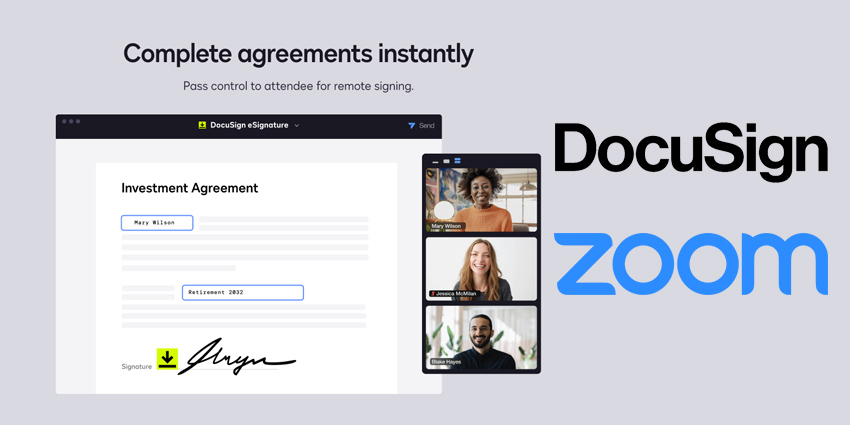
DocuSign eSignature for Zoom is available in the Zoom App Marketplace and lets users “reimagine agreement processes with virtual, face-to-face signing”.
When in the Zoom meeting, users can select the correct document from the “find your agreement” tab in the right pane of the app and give control to the signer.
Ross Mayfield, Product Lead, Zoom Apps & Integrations, said: “Employees don’t want to spend their days toggling between countless apps and emails, especially when working with customers or partners. They want tools that streamline workflows and quickly enable them to connect and collaborate.
“We’re excited about DocuSign eSignature for Zoom as it allows stakeholders to review agreements together in real-time before signing, helping eliminate communication silos and accelerate the completion of agreements.”
Introducing the all new eSignature app for @Zoom.
Remotely sign agreements right from Zoom.
— DocuSign (@DocuSign) February 15, 2022
The document signers do not need to have either a Zoom or DocuSign account; they need to participate in the meeting.
The app has built-in security, with users having access to DocuSign’s signer identification methods, such as verifying a signers photo ID.
DocuSign said users should send the document to the signer before the Zoom meeting before opening the document in the eSignature app when in the meeting.
All parties are then sent a copy of the agreement once the signee has signed.
Jerome Levadoux, SVP of Sign, DocuSign, said: “The past few years have highlighted the need for agility and better productivity tools to meet the evolving needs of customers.
“We are excited to partner with Zoom to offer the DocuSign eSignature app for Zoom to make it easier than ever to streamline how we collaborate and come to agreement in the emerging anywhere economy.”