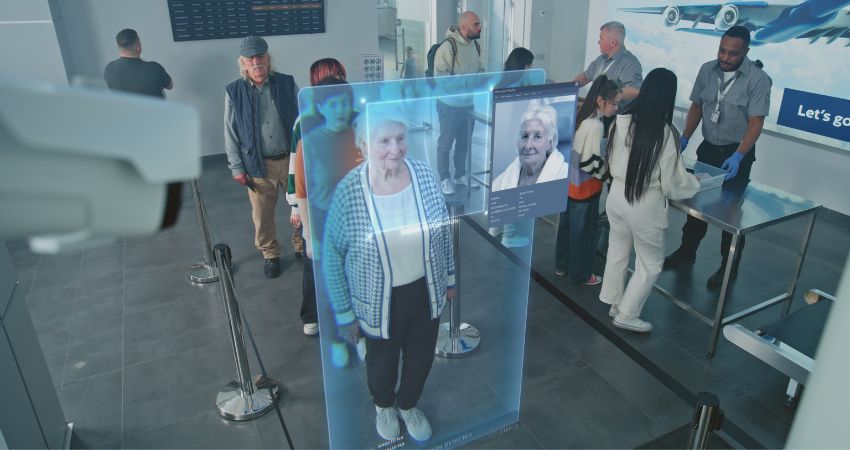

XR security has quickly become a board-level conversation—not because immersive tech is “scary,” but because it changes what your endpoints can see, hear, and remember. Once an organisation moves beyond demos and starts using XR for training, remote assistance, or immersive collaboration, the attack surface expands in ways traditional security models weren’t built to cover.
In other words: it’s not just another device class. It’s a new data class. Apple stated:
“Optic ID data is encrypted and never leaves your device. Like Touch ID and Face ID data, it is only accessible to the Secure Enclave.”
That one quote captures the shift. XR devices can involve biometric identity, spatial mapping, and persistent environment sensing—so your existing privacy, compliance, and risk playbooks often only cover part of the story today.
Related Articles:
- Will Immersive Collaboration Replace Meetings or Enhance Them?
- Why XR Workplace Pilots Fail and How Leaders Scale Them
What Security Risks Exist in XR Environments?
Most enterprise security teams already know how to secure laptops, phones, and meeting rooms. However, XR introduces a different shape of risk because it blends endpoints with environment capture.
In XR environments, “data” isn’t just documents and chat logs. Instead, XR can generate sensor streams, room geometry, gaze direction, hand tracking, voice, and video—often captured inside real workflows. As a result, XR creates three predictable security pressure points.
First: XR expands the attack surface. Cameras, microphones, and sensors increase both the number of inputs and the number of ways attackers can exploit or exfiltrate data. Apple’s own framing shows how sensor-rich these devices are:
“Apple Vision Pro is powered by the groundbreaking R1 chip, which processes input from 12 cameras, five sensors, and six microphones…”
Second: XR raises the data sensitivity bar. Spatial mapping, biometric authentication, and “what happened in the room” can move from theoretical risk to operational risk—especially when teams embed XR into collaboration or frontline support workflows.
Third: XR accelerates workflow risk. XR creates the most value when teams integrate it with training systems, service workflows, and collaboration platforms. At the same time, integration adds permissions, identity touchpoints, and configuration complexity—so missteps become more likely unless teams design controls early.
How Is Biometric Data Protected in Immersive Platforms?
Biometric data protection in XR isn’t one control—it’s an operating stance. Therefore, the questions that matter at evaluation stage stay basic but non-negotiable:
Where do teams process biometric data? Where do they store it? Who can access it? And what happens when a device moves between users, locations, or departments?
In consumer devices, vendors often explain biometric protection in simplified terms. For enterprise buyers, however, the useful part is the architecture principle.
For CIOs and CISOs, the practical takeaway is simple: if biometric authentication exists, you need clarity on device-level security boundaries, and you need policies for shared use and identity lifecycle. Too often, XR rollouts fail security review because the organisation can’t explain those basics in plain English.
What Compliance Standards Apply to XR Technologies?
There isn’t a single “XR compliance standard.” Instead, XR inherits obligations from the environments it touches.
For example, when teams use XR for workforce training, they may intersect with compliance logging, competency records, and regulated operating procedures. Likewise, when teams use XR for remote assistance, they may trigger recording policies, customer/site confidentiality expectations, and data residency requirements. Meanwhile, when teams deploy XR in healthcare or critical infrastructure, the compliance bar climbs fast.
The smartest approach treats XR as a regulated workflow surface, not a novelty endpoint. Consequently, your compliance programme should be able to answer:
- What categories of data do we capture (video, audio, spatial mapping, biometrics, annotations)?
- Which categories do we store vs process ephemerally?
- Which retention policies apply—and who owns them?
- How do audit trails work when XR content changes over time?
Even if you don’t operate in a heavily regulated sector, procurement teams increasingly expect those answers during enterprise XR compliance reviews—because “we didn’t think about it” won’t survive scrutiny when the device literally sees the world.
How Should Enterprises Secure XR Devices?
Here’s the boring truth that saves budgets: if IT can’t manage XR devices like any other endpoint, the XR programme won’t scale. Therefore, security can’t sit as a bolt-on layer; it has to act as the entry ticket.
That’s why device management matters so much. Microsoft is explicit about enterprise management patterns for HoloLens through mobile device management (MDM):
Example (enterprise device management): Microsoft documents how HoloLens can be configured through MDM policies, including controls for device behaviour and application deployment.
Whether you choose VR headsets, smart glasses, or mixed reality devices, the same operational checklist applies:
- Provisioning: enforce secure enrolment, identity binding, and baseline policies.
- Patch cadence: keep OS and app updates predictable without breaking workflows.
- Access control: apply least privilege, role-based access, and auditability.
- Remote actions: enable remote wipe, lock, and asset recovery.
- Shared device reality: support fast user switching without security shortcuts.
XR isn’t special here. Instead, XR punishes teams faster when they treat endpoint basics as optional.
How Do You Evaluate XR Vendors for Security?
Most XR vendor evaluations still overweight “experience quality” and underweight “operational survivability.” However, enterprise rollouts reward survivability.
Security evaluation shouldn’t live in a separate spreadsheet. Instead, it should sit inside the core shortlist logic: can IT deploy it, can security govern it, and can the business run it without accidental data exposure?
When XR platforms intersect with immersive collaboration, vendor language often focuses on ease of creation and accessibility. Microsoft, for example, positions Teams immersive experiences as something teams can build without specialist effort:
“Design 3D spaces and schedule immersive events for PC or Mac—no coding or technical expertise needed.”
That’s a productivity win. At the same time, it’s a governance moment. If non-technical teams can create immersive spaces, IT must still control identity, access, content publishing, and retention in a way that doesn’t rely on “please don’t do that.”
For buyers, the best vendor security questions sound like this:
- What identity providers do you support, and what does “shared device” authentication look like?
- What do you log, and how can teams export logs into SIEM / audit tooling?
- Which sensors do apps access by default—and can the enterprise restrict or disable specific data capture?
- What happens when content updates? Do you support versioning, rollback, and change tracking?
- What incident response policy do you run, and what escalation paths do enterprise customers get?
What Governance Policies Protect Immersive Workspaces?
XR governance is where most pilots quietly die—because governance is where XR stops being “cool tech” and becomes “enterprise reality.” So, if you want XR to scale, design governance upfront.
Strong governance policies cover three layers.
1) People: ownership across IT, security, and the business. Someone must own device lifecycle, someone must own content quality, and someone must own workflow outcomes.
2) Process: review cycles for content and policies. XR content decays, equipment changes, and workflows evolve. When XR guidance falls behind reality, trust drops. Then usage drops. (Yes, the dominoes really do fall in that order.)
3) Platform controls: identity, device management, and secure content distribution. This is where immersive platforms matter—not just headsets. NVIDIA’s description of how Omniverse capabilities sit on OpenUSD is a useful example of what “platform layer” looks like in practice:
“NVIDIA Omniverse libraries, microservices, and APIs are built on top of OpenUSD to simplify the adoption of NVIDIA’s physical AI simulation technologies across data interoperability, physics, and rendering.”
Even if your organisation isn’t building digital twins, the principle still carries: XR security maturity improves when the stack supports interoperability, controlled publishing, and predictable integration—rather than bespoke one-off experiences that nobody can govern.
Bottom line: immersive workplace privacy and XR security don’t fail because the tech is impossible. Instead, they fail when teams treat governance as paperwork instead of design.
Subscribe to our newsletter for all the latest XR updates.
FAQs
What security risks exist in XR environments?
XR expands the enterprise attack surface through always-on sensors (cameras, microphones, tracking), spatial mapping, and workflow integration. The biggest risks include data leakage, misconfigured permissions, weak device management, and unclear governance for capture and retention.
How is biometric data protected in immersive platforms?
Protection depends on architecture. Enterprise teams should look for device-level isolation (e.g., secure enclave-style approaches), encryption, strict access controls, and clear policies for shared device usage and identity lifecycle.
What compliance standards apply to XR technologies?
XR inherits compliance obligations from the workflows and sectors it supports. That can include privacy, data retention, auditability, and regulated operating procedures. In practice, buyers should treat XR as a governed workflow surface, not a gadget.
How should enterprises secure XR devices?
Secure XR devices like any endpoint: enforce enrolment and provisioning, integrate identity, require patching and app controls, use MDM/UEM, maintain audit logs, and ensure remote lock/wipe capabilities. If the endpoint can’t be managed, it shouldn’t scale.
How do you evaluate XR vendors for security?
Ask for operational proof: IAM integration, device management compatibility, logging and export, sensor permissions, content governance, incident response, and security documentation that survives procurement scrutiny.
What governance policies protect immersive workspaces?
Define ownership (IT/security/business), maintenance processes (content updates and reviews), and platform controls (identity, access, device lifecycle, retention). XR succeeds long-term when teams build governance in—not when they bolt it on after the pilot.