
Samsung has unveiled new software features for its interactive display lineup at ISTELive 26 in Orlando this week, targeting a persistent pain point in schools: what happens when multiple teachers share the same screen.
The company’s new Account Management Solution (AMS) and AI Assistant additions are aimed squarely at the practical, often unglamorous realities of running technology in a school environment — shared devices, inconsistent setups, and teachers spending more time managing screens than teaching.
“Digital classrooms depend on the right balance of advanced hardware, intelligent software and intuitive user experiences,” said Hyoung Jae Kim, Executive Vice President of the Visual Display (VD) Business at Samsung Electronics.
“By bringing together AI and seamless connectivity, Samsung’s interactive display solutions are designed to support a more flexible, connected learning environment in which teachers and students can thrive.”
Interactive displays have become a fiercely contested category, with vendors including Google, Promethean, SMART Technologies, and Clevertouch all pushing into AI-powered classroom tools.
Samsung, better known in the consumer electronics space, has been working to establish its Interactive Display lineup as a credible enterprise-grade option for education.
The Shared Device Problem
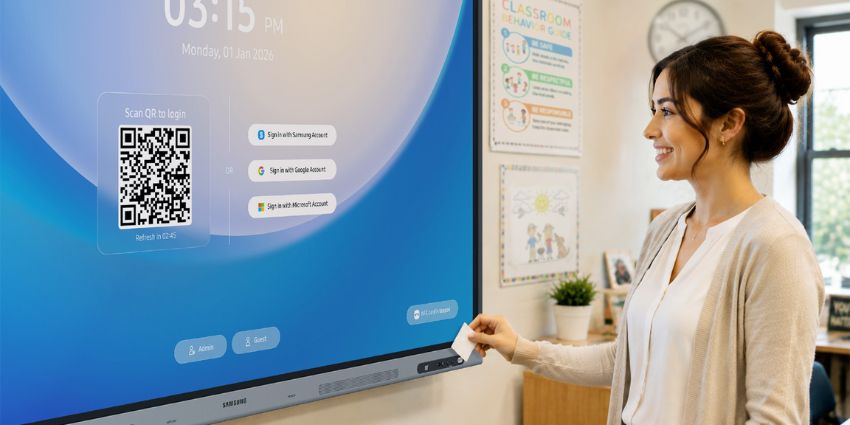
Samsung AMS allows teachers to log in to a shared display using a QR code or an NFC-enabled ID card, pulling their personalised profile – layout, bookmarks, app shortcuts, wallpaper, files – from the cloud.
Sign out, and the display resets, ready for the next user. A screen lock feature lets teachers briefly step out of the room without leaving their session exposed.
It is, in essence, the kind of roaming profile functionality that enterprise IT teams have expected from Windows machines for years, applied to the interactive display context.
The implementation via NFC card is a practical touch; teachers are already accustomed to carrying ID cards, and removing the need to type a password on a classroom display is a genuine usability improvement.
For IT administrators, a central Samsung Education Portal handles device enrolment, user registration, and NFC card binding.
A tagging feature lets teams group displays by school, building, or room – and those same tags can be used to push emergency alerts through platforms like InformaCast and Raptor. That last point will matter to district-level IT buyers increasingly focused on school safety infrastructure.
AMS is scheduled to roll out in July.
AI in the Classroom: Useful or Overhyped?
Samsung AI Assistant, which launched in April and is already available on compatible displays, is the company’s answer to the broader push toward AI-powered teaching tools.
The feature set covers transcription, content summaries, quiz generation, and a version of Google’s Circle to Search adapted for the classroom display context.
Live Transcript – converting spoken instruction into real-time on-screen text – is arguably the most straightforwardly useful of the lot. For students with hearing impairments or those learning in a second language, live captioning on a classroom display addresses an accessibility need that schools have long struggled to meet without specialist equipment. The caveat, as with most voice-based tools, is that supported languages vary by model and region, which will limit its reach in practice.
AI Quiz, which generates comprehension questions from recorded lesson content, sits in more contested territory. The idea of AI-generated assessments has attracted both enthusiasm and scepticism from educators, with concerns ranging from question quality to the risk of reducing assessment to a mechanical exercise.
Whether teachers find it genuinely time-saving or just another feature they ignore will depend heavily on implementation and training.
Hardware: Bigger Screens, Updated OS
On the hardware side, Samsung used ISTELive to introduce three new models: the WAF-S, WAFX-PS, and WAHX-M.
The first two are effectively refreshes of existing lines, upgraded to Android 16 – a meaningful update given the security and privacy improvements baked into the latest Android release, and one that gives schools a more defensible compliance posture.
The WAHX-M is the more interesting addition. Offered in sizes up to 98 inches, it opens Samsung’s interactive display portfolio to larger lecture halls and conference spaces – an area where commercial AV vendors have traditionally held ground. At that screen size, the on-device AI features, including voice command and text-to-speech, become more relevant; a 98-inch display in a 200-seat lecture hall is a different product category from a classroom touchscreen.
All new models are EDLA-certified, meaning Google Mobile Services – including Google Classroom and Google Drive – run natively.
That matters in markets where Google Workspace for Education has strong penetration, and it removes a friction point that has historically made Android-based displays a harder sell than Chrome-based alternatives in some districts.
The Bigger Picture
Samsung is not the first to bring roaming profiles or AI tools to interactive displays, and it will not be the last. Promethean has offered cloud-based teacher profiles for some time, and SMART’s iQ platform has its own AI feature roadmap.
What Samsung is betting on is that its hardware scale, combined with a tightening software ecosystem, can make its displays the default choice for large district deployments where procurement, management, and support at scale matter as much as any individual feature.
Whether AMS and AI Assistant move the needle will depend on execution – specifically, how reliably the NFC sign-in works across different classroom environments and how quickly Samsung can expand regional availability beyond the initial rollout markets.